


Direct answer: NoviSpy illustrates a physical-custody threat: an adversary may use access to a phone to enable surveillance that continues after the phone is returned. Enterprise defenses need three layers—reduce what a seized device exposes, restrict unauthorized changes, and establish an evidence-preserving response before reconnecting it to sensitive work. Encryption and mobile management remain useful, but neither is a certificate that a returned device is trustworthy.
This guide is for security architects, incident responders, and organizations supporting high-risk staff. It separates documented historical findings from proposed operational controls. Research was checked on October 19, 2026. No phone, spyware sample, forensic extraction product, GrapheneOS deployment, or management policy was tested for this article. Technical review is pending.
What the NoviSpy investigation actually established
In its December 2024 report, “A Digital Prison,” Amnesty International documented NoviSpy infections associated with periods when Serbian authorities held journalists’ and activists’ phones. It linked Cellebrite-assisted unlocking to at least two infections. Its timelines show different installation paths, including Android Debug Bridge (ADB) and a package-installer route. The report also describes changes to protective settings and recovered screenshots of messaging activity, alongside microphone and camera capabilities.
A separate February 2025 investigation examined a USB-driver exploit chain used against a student activist. It linked the research to CVE-2024-53104. The Android February 2025 bulletin lists that UVC-driver issue under the 2025-02-05 security patch level and notes indications of targeted exploitation.
These are historical findings, not evidence that the same exploit works against every current handset. Do not collapse separate cases into one universal “BootROM exploit → ADB → spyware” sequence. An enterprise assessment must identify the actual device, build, exposure, and evidence. Nor should a 2025 patch date become a sufficient security baseline for a phone used in 2026.
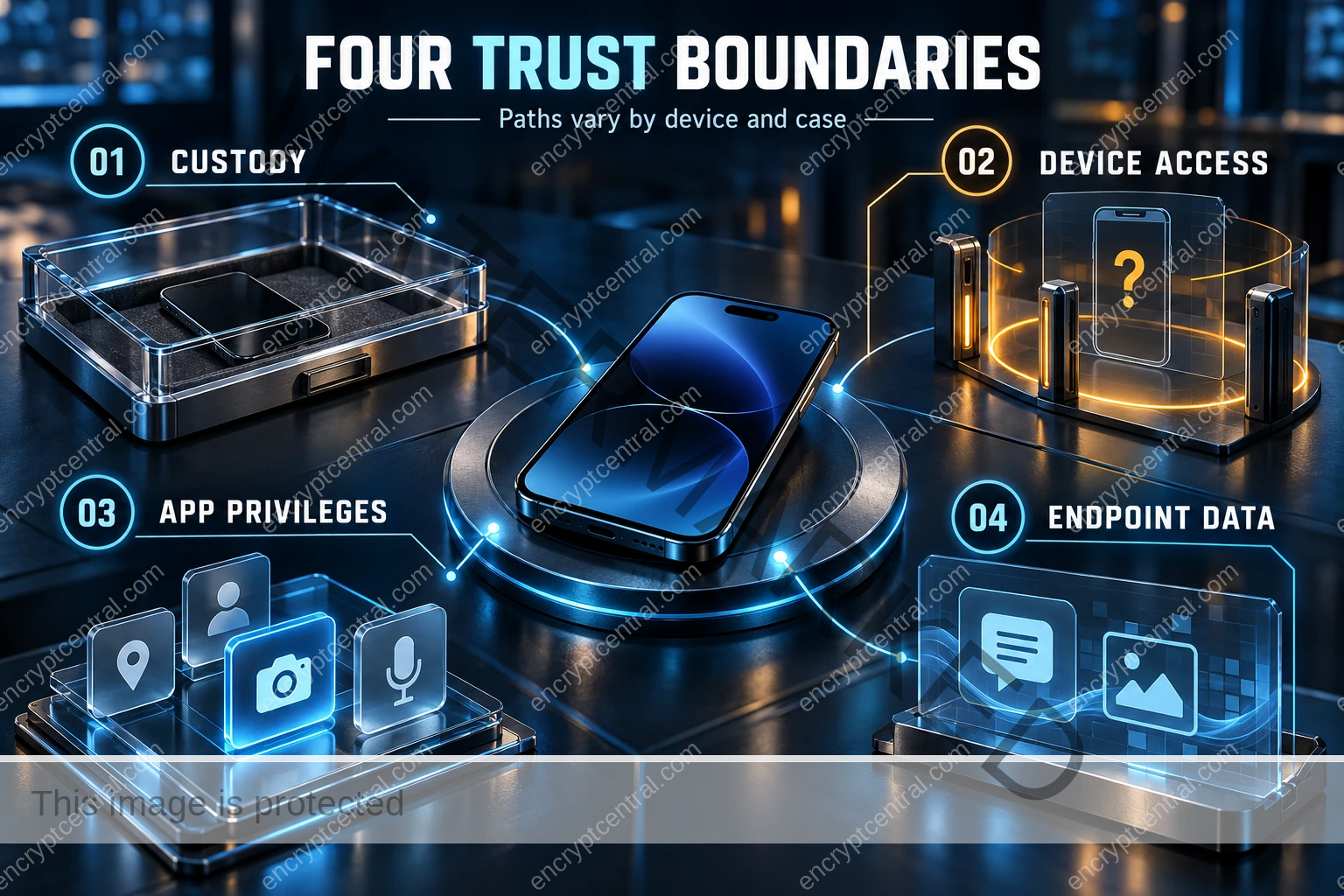
Keep the security boundaries separate
End-to-end encryption protects communications between endpoints; it cannot make an already compromised endpoint trustworthy. Screen capture on a phone is a different problem from decrypting intercepted network traffic. Abandoning encrypted messaging would remove a useful protection without repairing the phone. CISA’s mobile communications guidance, updated in November 2025, continues to recommend encrypted communications while addressing risks to highly targeted individuals.
Storage encryption has its own boundaries. Android’s file-based encryption documentation distinguishes credential-encrypted storage, available after the user unlocks, from device-encrypted storage available during Direct Boot. “Before first unlock” (BFU) and “after first unlock” (AFU) are useful shorthand, not a complete inventory of every file and key. Simply locking the screen is not equivalent to rebooting into the pre-unlock state.
| Boundary | Useful question | Unsafe inference |
|---|---|---|
| Physical custody | Who controlled the phone, for how long, and in what known state? | It was returned intact, so nothing changed. |
| Storage and lock state | Which protections apply to this build and current unlock state? | A strong passcode guarantees resistance to every extraction method. |
| Application privileges | What changed in packages, permissions, accessibility, and management? | Every unfamiliar service is malware—or every familiar name is legitimate. |
| Enterprise access | What accounts, sessions, recovery paths, and confidential data were reachable? | Restoring a green compliance indicator closes the incident. |
Prepare a custody-risk profile before an incident
Start with the person’s work rather than a universal “maximum security” configuration. An executive carrying acquisition documents, a journalist protecting sources, and an administrator carrying privileged recovery access have different consequences of exposure. Identify the minimum data and authority each person needs while traveling or entering a setting where device custody may be lost. Everyday theft and handling precautions belong alongside this plan; EncryptCentral’s physical device security guide covers that broader foundation.
The following is a proposed operating model, not a NIST-mandated checklist. NIST SP 800-124 Revision 2 supplies the broader enterprise mobile-lifecycle framework, including centralized management and different ownership arrangements.
- Name the decision owners. Record the user, security contact, incident lead, mobile-platform owner, and person authorized to accept residual risk. Agree on a trusted alternative contact channel.
- Reduce the exposed working set. Review offline documents, cached conversations, privileged apps, and recovery material. Consider a separately provisioned travel device for a defined job. Avoid automatically restoring a full personal or corporate backup onto it.
- Record a baseline. Capture the model, OS build, security patch level, enrollment mode, policy version, approved applications, and applicable exceptions. Protect the record rather than leaving sensitive inventory on the same phone.
- Verify support and updates. Confirm that the exact model remains supported and that required updates actually reached it. Record failed deployments and exceptions; a console’s desired policy is not evidence of the device’s effective configuration.
- Plan the return path. Decide how the user gets a replacement work device, how an examiner is contacted, and who preserves relevant server-side records. Do this before someone is pressured to keep working on a questionable phone.
For foundational controls, pair this plan with EncryptCentral’s guide to securing sensitive data on mobile devices. This article adds the custody and investigation decisions; it does not replace routine device hygiene.
Verify management controls instead of trusting their labels
Google documents separate controls for debugging, untrusted application installation, and application verification. In the UserManager API, DISALLOW_INSTALL_UNKNOWN_SOURCES explicitly excludes ADB. Therefore, an “unknown sources blocked” setting alone is not proof that every installation path is blocked. The same reference documents DISALLOW_DEBUGGING_FEATURES and ENSURE_VERIFY_APPS; enforcement depends on the relevant platform and management scope.
For deployments using the Android Management API, review advancedSecurityOverrides.developerSettings, untrustedAppsPolicy, and googlePlayProtectVerifyApps. These are documented fields, not a configuration tested here. A personally owned work profile is not interchangeable with fully managed corporate ownership. Check the documentation and your EMM provider’s mapping before deployment.
Turn that review into a small acceptance test on an authorized spare device. Record enrollment mode and build, apply the candidate policy, then inspect the effective restriction and any noncompliance details. Test the ordinary user paths the policy claims to restrict. Separately document debugging and privileged-installation exceptions. Do not introduce spyware or an exploit kit merely to demonstrate that a settings toggle works.
Keep the test result narrow: “this user path was blocked on this configuration” is defensible. “This phone cannot be compromised through physical access” is not. For a reusable evidence-and-retest approach, see the security misconfiguration detection and remediation checklist.
USB controls and reboot policies need a deployment decision
GrapheneOS documents USB-C port controls and configurable automatic reboot. Its USB protection has explicit operating-state boundaries: the documentation describes protection while the OS is booted and identifies exclusions such as recovery and firmware-based fastboot modes. Do not describe it as a universal hardware-access barrier.
These features are candidates for an evaluated high-risk deployment, not a reason to switch a working fleet without testing. Check supported hardware, application compatibility, support ownership, emergency communications, and the actual build’s behavior. Treat reboot or shutdown rules as preparation decisions. Once an incident exists, changing power state may conflict with an examiner’s preservation plan. Do not improvise a reboot, wipe, or duress action during detention; personal safety and applicable legal obligations take priority.
Consider forensic logging—and its privacy cost
Current preparation can include a deliberate review of Android Intrusion Logging where supported. Google’s documentation describes it as an optional Advanced Protection feature recording activity such as app changes, network events, USB file transfers, and lock or unlock events. It is evidence for investigation, not a shield against every attack.
The same documentation states that encrypted logs are stored for 12 months and cannot be manually deleted during that period. Once downloaded and decrypted, their protection becomes the recipient’s responsibility. Google also warns about legal-access risks, and notes that logging frequency can decrease during very heavy activity.
Before enabling it, confirm availability on the exact device, who can retrieve the logs, where decrypted exports would be stored, and whether retention is appropriate for that person’s circumstances. Explain those tradeoffs to the user. Do not assume every Android handset supports the feature, that every event will be recorded, or that enabling it after an incident reconstructs earlier activity.
Respond to a returned device without destroying the evidence
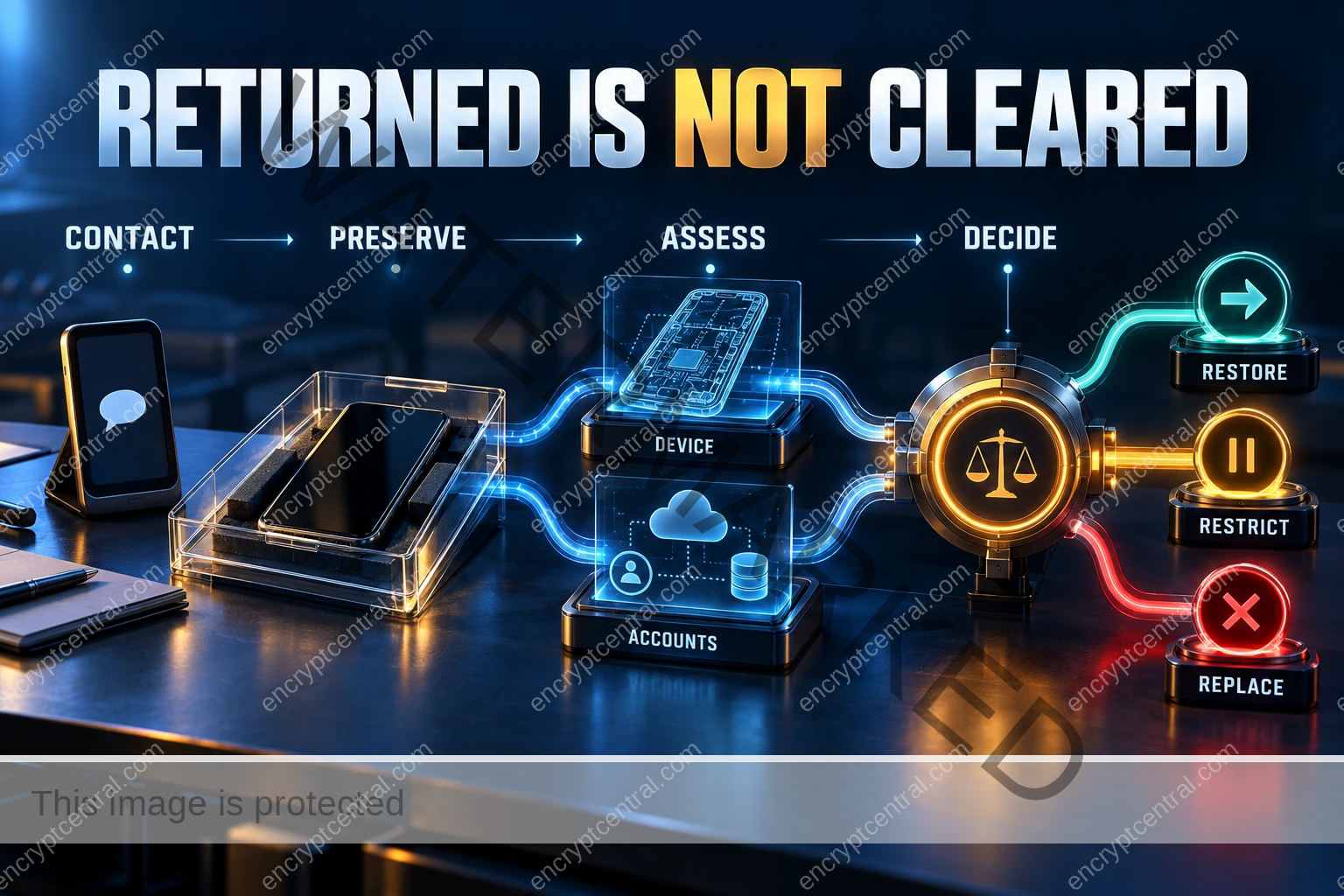
A loss of custody is an exposure event, not automatically proof of infection. Conversely, a phone that looks normal is not cleared. Keep those statements separate so the response can be proportionate without offering false reassurance.
The sequence below is an editorial response framework built around preservation and documented decisions. NIST SP 800-101 Revision 1 distinguishes preservation, acquisition, examination, analysis, and reporting. It is an older forensic-process reference, not a source of current Android command syntax.
- Move sensitive coordination to a trusted alternative. Contact the incident lead without relying on the returned phone for confidential discussion or credential recovery. Make sure the user still has a safe way to communicate.
- Record the custody timeline. Note handover and return times, who held the device, what the user remembers about its state, requests to unlock it, and visible changes. Distinguish observation from inference. Do not repeatedly explore the phone to “find something.”
- Get handling instructions. Let the qualified responder decide network isolation, charging, power state, and collection priorities. There is no universal airplane-mode, power-off, or remote-wipe instruction that preserves every objective. Record necessary changes and their times.
- Preserve external evidence. Where authorized, retain relevant identity, messaging, EMM, and business-system records. Use a documented time window and protect personal information. Server-side evidence may help even when device collection is limited.
- Assess account exposure separately. From a trusted device, have the identity owner review sessions, authentication changes, recovery settings, and accessible business systems. Decide which sessions or credentials need revocation. A password change alone should not stand in for that review.
- Authorize collection and recovery. Establish informed consent, lawful authority, scope, evidence storage, and the examiner’s plan before acquisition. Avoid uninstalling suspicious apps, rooting, bootloader unlocking, resetting, or flashing as an improvised first step.
Use MVT and AndroidQF as investigative tools, not clearance buttons
The maintained MVT Project AndroidQF repository describes acquisition of forensic data from Android devices. Its documentation requires USB debugging and host authorization for its normal USB workflow. Collection is therefore an intervention that must be planned and recorded, not a magically passive scan.
Mobile Verification Toolkit supports consensual forensic analysis. Results need interpretation against the collected artifacts and relevant indicators. No match does not establish that a phone is uncompromised. An incomplete acquisition, inaccessible profile, missing artifact, or unfamiliar attack can leave important questions unanswered.
Amnesty’s August 2026 secure-design assessment announcement addresses the combined AndroidQF/MVT workflow, including evidence handling, isolation, untrusted inputs, and usability. It is a useful reminder to evaluate the investigation environment too—not a claim that every recommendation has already been implemented.
Ask the examiner to report collection scope, tool versions, integrity records, errors, unavailable data, indicator provenance, and confidence. Keep raw acquisitions encrypted with restricted access and an agreed retention plan. Do not upload them to a general-purpose AI assistant, public ticket, or shared marketing drive. This guide deliberately omits a copy-and-paste ADB appendix: a few diagnostic commands would not constitute a complete or validated forensic examination.
Make the return-to-service decision explicit
Do not make the employee infer “safe to use” from silence after a scan. Give the incident lead a written disposition that separates three questions: what evidence was found, what remains unknown, and what access the business is willing to restore.
| Finding | Proposed disposition | Evidence required before closure |
|---|---|---|
| Credible compromise or malicious changes | Keep the device out of sensitive service while preservation and remediation are planned; provide an alternative. | Investigation record, account containment, authorized recovery or replacement, and verification of the new working state. |
| No match, but substantial collection gaps or high consequences | Retain an inconclusive finding. Consider replacement or continued restriction rather than declaring the original clean. | Documented gaps, residual-risk decision, data/account review, and a named approver. |
| No concerning findings within an adequate agreed scope | Consider proportionate restoration under the organization’s policy. | Scope and limitations, effective baseline checks, account review, and a recorded release decision—not an absolute guarantee. |
Replacement is a risk-management choice, not proof that extraction never occurred. Reprovisioning also does not retract information already copied elsewhere. Decide what data, tokens, recovery methods, and privileged roles must change independently of the handset. If evidence retention conflicts with operational recovery, document the tradeoff rather than erasing it through a routine help-desk reset.
The practical next step
Choose one high-risk role and rehearse the custody scenario using a spare device and synthetic data. Can the employee reach security through a trusted channel? Can the business issue a replacement without restoring unnecessary sensitive material? Can an examiner preserve evidence before help-desk automation wipes it? Who signs the release decision when collection is inconclusive?
Use the exercise to improve the plan, not to claim that one successful drill defeats every forensic product. The durable lesson from NoviSpy is to manage the transition back to trust deliberately. Reduce exposure before custody is lost, preserve the ability to investigate afterward, and require evidence—not appearance—to justify renewed access.
Related posts:
 The Four Pillars of AI Security: Building Robust Defense Against Intelligent Attacks
 How Can I Ensure The Physical Security Of My Devices?
 Enterprise AI Governance: Building Comprehensive Risk Management Frameworks
 Preventing and Mitigating Prompt Injection Attacks: A Practical Guide
 Building Complete AI Security Solutions: Your Comprehensive Implementation Guide
 Smishing, Vishing, and Mobile Phishing Response Guide


