


Direct answer: Use SPF to authorize the systems that may send with your domain, DKIM to sign each legitimate message with an aligned domain, and DMARC to compare those authenticated identities with the domain people see in the From address. Start DMARC in monitoring mode, inspect aggregate reports, repair every legitimate failure, and only then decide whether quarantine or reject is safe for your mail flows. This sharply reduces successful spoofing of your exact domain at receivers that evaluate DMARC, but it does not stop lookalike domains, display-name deception, compromised accounts, or every phishing message.
What to do first
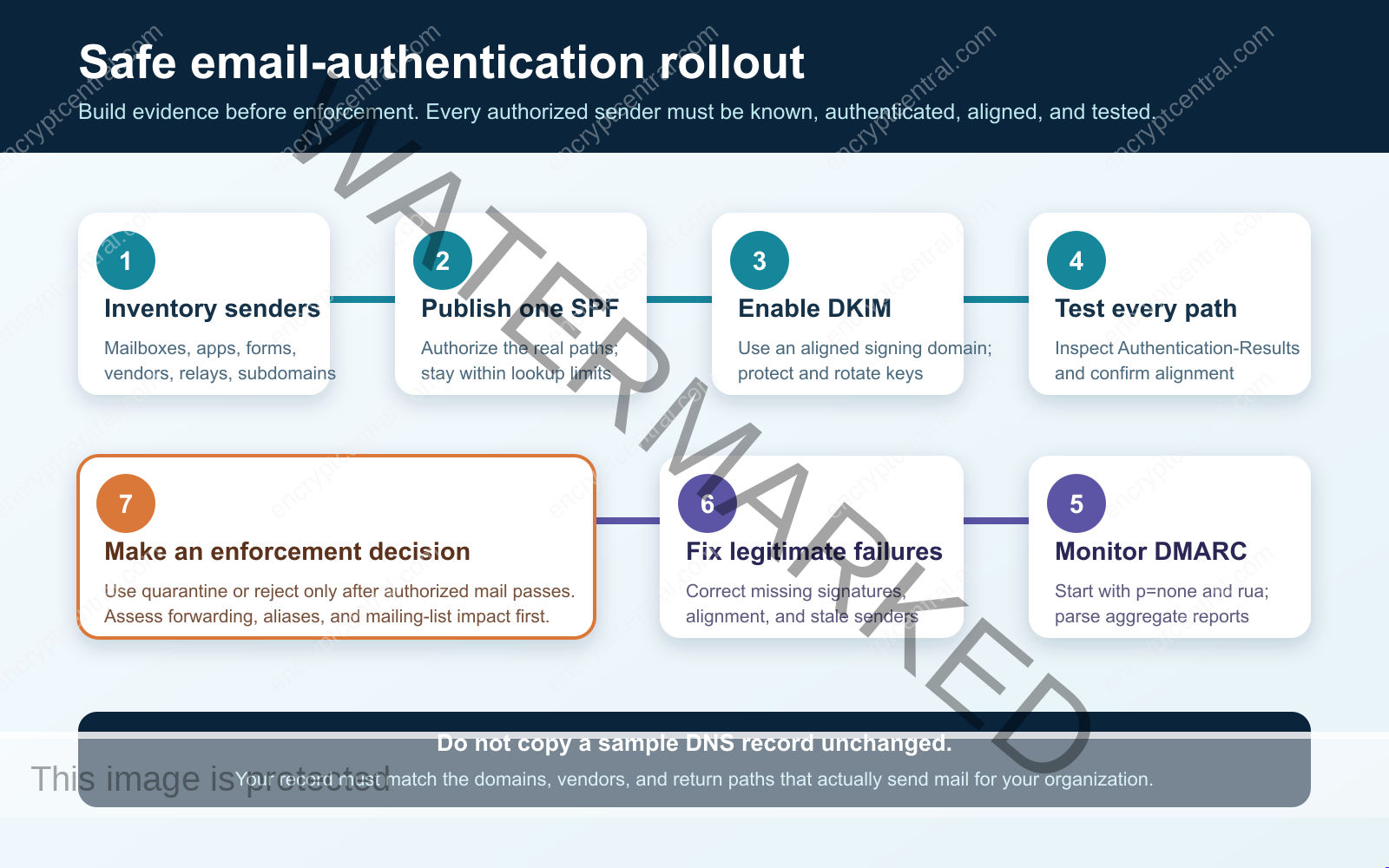
- Inventory every service that sends mail as your domain.
- Make both SPF and DKIM align wherever your platforms allow it.
- Publish DMARC with
p=noneand an aggregate-report address. - Test real messages and fix authorized failures before enforcement.
This guide is for the person responsible for a business domain, DNS, or outbound email—not only the primary mailbox platform. Marketing tools, invoices, support systems, website forms, scanners, alerts, recruiting platforms, and managed providers can all send mail that appears to come from your organization. Missing one can turn a well-intended policy change into lost customer mail.
The technical foundation is the current IETF standard, RFC 9989 for DMARC, published in May 2026. It supersedes RFC 7489 and separates aggregate reporting into RFC 9990. SPF remains defined by RFC 7208, while DKIM is defined by RFC 6376 with later cryptographic updates. NIST also treats SPF, DKIM, and DMARC as complementary parts of trustworthy email, not interchangeable controls.
What SPF, DKIM, and DMARC each prove
SPF authorizes a sending path
Sender Policy Framework lets a domain owner publish which hosts may use that domain in the SMTP envelope identity. A receiving server evaluates the connecting sender against the SPF policy for the MAIL FROM domain. This is useful, but that envelope identity is not necessarily the From address displayed to a person. An attacker can pass SPF using a domain they control while placing a different brand in the visible From field.
That is why “SPF passed” is not the same as “this message is authorized to appear from our domain.” DMARC adds the missing alignment check. For SPF to support a DMARC pass, the SPF-authenticated MAIL FROM domain must align with the visible From domain.
DKIM validates a domain signature
DomainKeys Identified Mail adds a cryptographic signature to selected headers and the message body. The signature identifies a signing domain and selector. The recipient uses those values to locate the public key in DNS and verify that the signed parts were not changed after signing.
DKIM does not prove the identity of the human author, and any domain can sign its own mail. For DKIM to support a DMARC pass, the validated signing domain must align with the visible From domain. A properly aligned DKIM signature is especially useful when a legitimate forwarder changes the route and causes SPF to fail.
Use current cryptography. RFC 8301 prohibits RSA-SHA1 for DKIM, requires RSA keys of at least 1024 bits, and recommends at least 2048 bits. Follow your sending provider’s current instructions for supported algorithms, key size, selectors, and rotation. Never invent or copy another organization’s DKIM public key.
DMARC connects authentication to the visible From domain
DMARC extracts the Author Domain from the visible From field. A message passes DMARC when at least one supported authentication path passes and aligns: an aligned SPF pass or an aligned DKIM pass. Under relaxed alignment, the authenticated and visible identities can share the same organizational domain; under strict alignment, they must match exactly. Relaxed alignment is the usual starting point unless a documented risk justifies stricter handling.
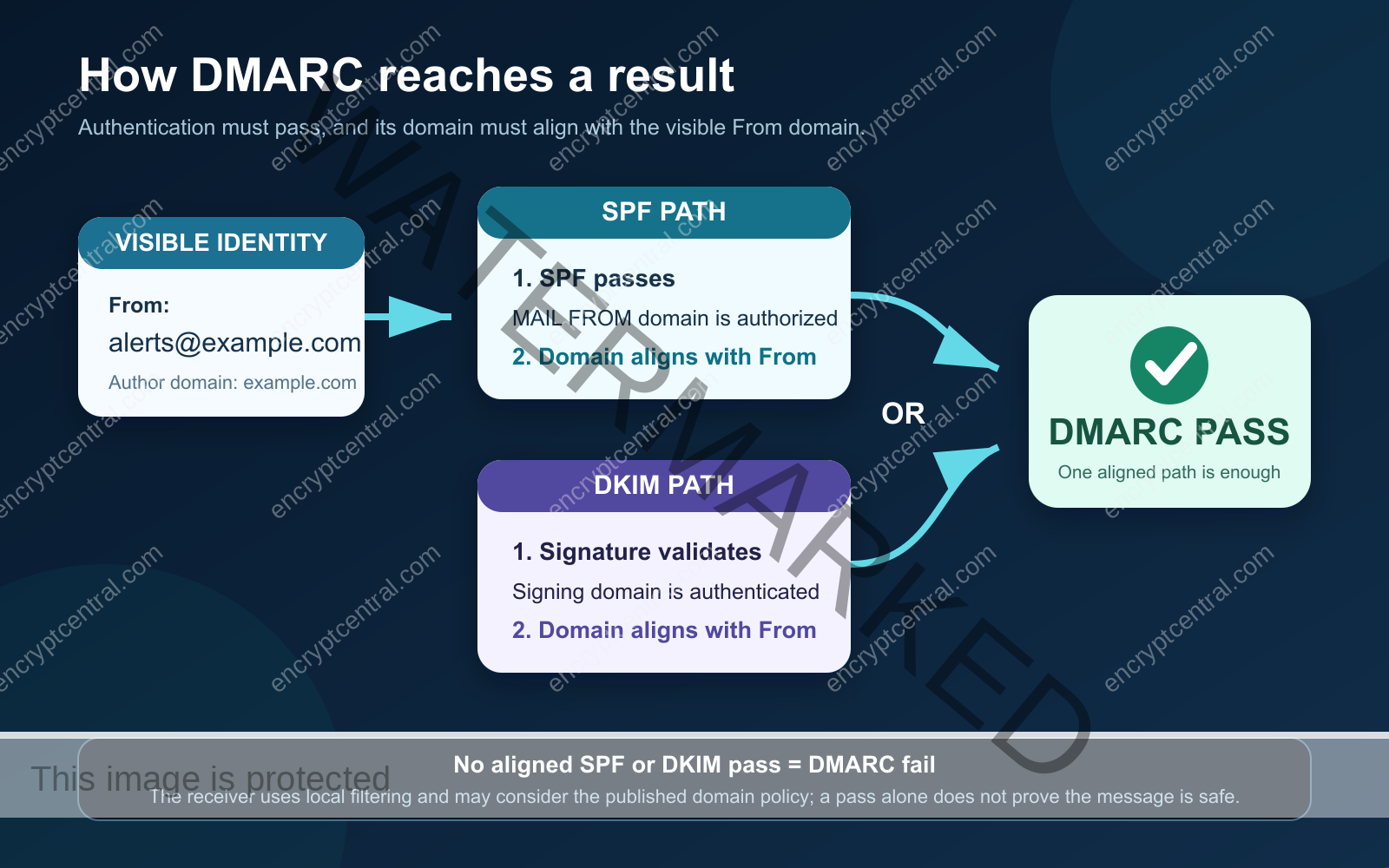
A DMARC record also states the domain owner’s requested handling for failures and can request reports. Receivers apply local policy and are not obligated to follow every request exactly. A DMARC pass means the visible domain use was authorized through an aligned mechanism; it does not mean the sender is benevolent, the account is uncompromised, or the content is safe.
Step 1: inventory every legitimate sender
Begin with evidence, not DNS. Create one row for every system that sends using your visible domain or a subdomain. Include the business owner, technical owner, From domain, MAIL FROM or return-path domain, DKIM signing domain and selector, expected volume, recipient types, and a sample Message-ID. Record whether the stream is active, seasonal, emergency-only, or scheduled less often than monthly.
Ask finance about invoices and payroll, marketing about campaigns, sales about customer platforms, IT about monitoring and ticketing, developers about applications and cloud services, facilities about printers and scanners, and vendors about managed notifications. Search recent message headers and existing SPF includes. Review DNS, but do not assume every old authorization is still legitimate or that every real sender is already listed.
Decide whether each service truly needs to send as the organizational domain. A dedicated subdomain such as notify.example.com can separate an application stream from employee mail and make ownership clearer. That is an architecture choice, not a shortcut: the subdomain still needs correct authentication, monitoring, and lifecycle management.
Step 2: publish one maintainable SPF record
SPF is published as a DNS TXT record at the domain used in the SMTP envelope. RFC 7208 does not permit multiple SPF records for the same owner name. If two records begin with v=spf1, merge the authorized sources into one valid policy rather than leaving competing records.
A conceptual record looks like this:
example.com. TXT "v=spf1 include:_spf.provider.example -all"This is a placeholder, not a deployable recommendation. Use the exact include domains or IP ranges published by each active provider. Keep the record narrow, remove retired services through change control, and document why every mechanism exists. Do not add a broad authorization merely to make a test pass.
SPF evaluation allows no more than ten mechanisms or modifiers that trigger DNS lookups. Includes can call other records, so a visually short policy can still exceed the limit. Exceeding it produces a permanent error rather than a reliable authorization result. Count the full evaluation path after every provider change, and favor stable provider-supported designs over hand-built “flattening” that can silently age.
The final qualifier should reflect a deliberate deployment decision. Many providers suggest ~all during early setup and -all once the authorization set is trusted. Changing that qualifier can affect handling before DMARC evaluation in some receiver architectures. Treat it as a controlled change, test it, and do not assume DKIM will always rescue a message rejected early on SPF failure.
Step 3: enable aligned DKIM signing
For each sender that supports DKIM, generate or activate a key through that platform. The service normally gives you a DNS name containing a selector, such as selector1._domainkey.example.com, and a TXT or CNAME value. Publish exactly what the provider supplies, wait for DNS visibility, and then enable signing if the provider requires a separate switch.
Publishing a key does not prove the service is signing. Send a real message, inspect the DKIM-Signature header, confirm the signature verifies, and compare its d= domain with the visible From domain. For DMARC, a valid signature from an unrelated provider domain is not enough unless that signing domain aligns.
Keep private keys in the sending system or provider, not in tickets, general documentation, or DNS. Use separate selectors when rotating keys: publish the new public key, begin signing with the new selector, confirm successful verification, allow old signed mail to age through relevant queues, and then retire the old key according to your provider’s procedure. The selector is operational metadata, not a secret.
Step 4: test authentication and alignment
Send representative messages from every inventoried path to external mailboxes under your control. Include normal replies, automated notifications, website forms, attachments, forwarded copies, and any mailing-list route your users actually depend on. Use the recipient’s “show original” or full-header view and locate Authentication-Results.
For each test, record:
- the visible
From:domain; - the SPF result and SMTP MAIL FROM domain;
- the DKIM result, signing
d=domain, ands=selector; - the DMARC result and which mechanism aligned;
- the source system, date, recipient, and Message-ID;
- any transformation introduced by forwarding, gateways, footers, or mailing lists.
DNS lookups are useful but incomplete. Check the public records with commands such as nslookup -type=TXT example.com, nslookup -type=TXT selector1._domainkey.example.com, and nslookup -type=TXT _dmarc.example.com. Then verify an actual message. A syntactically valid record cannot prove that the application used the expected return path or added a valid signature.
Step 5: start DMARC monitoring
After SPF and DKIM are operating, publish a DMARC TXT record at _dmarc.example.com. A minimal monitoring record is:
_dmarc.example.com. TXT "v=DMARC1; p=none; rua=mailto:[email protected]"Replace the domain and mailbox with values you control. If reports go to a different organizational domain or a processing service, follow the current authorization process in RFC 9989 and the provider’s instructions. Restrict access to report data, define retention, and use a parser or reporting service that can group sources and preserve historical comparisons. Aggregate reports are machine-oriented operational evidence, not a substitute for mail logs or incident investigation.
Do not copy older rollout examples that use pct. RFC 9989 removed that tag after operational experience showed inconsistent application. Some provider help pages still mention it, but new deployment guidance should follow the current standard. Stage risk by fixing sources, testing representative flows, and making explicit policy changes—not by assuming a percentage tag will be honored consistently.
Step 6: read reports as an authorization ledger
Review aggregate data by source, sending domain, authentication result, alignment result, message count, and receiver. Classify each source as authorized and healthy, authorized but failing, unauthorized, unknown, or no longer needed. Investigate unknown high-volume sources quickly, but do not add them to SPF merely because they appear in reports. First identify the business owner and prove the sending relationship.
Authorized failures normally point to a concrete defect: a third party is not signing, the return path uses an unaligned domain, a selector is missing, an old service remains active, a gateway changes the message, or a subdomain lacks the intended policy. Assign an owner and due date. Retest the exact stream after repair and keep the new header as closure evidence.
Observe long enough to include low-frequency and irregular mail. A week may show daily traffic but miss month-end billing, quarterly notices, annual benefits messages, or incident-only alerts. Define readiness based on covered business cycles and verified sources, not an arbitrary calendar milestone.
Step 7: decide whether to enforce
DMARC supports p=none, p=quarantine, and p=reject. Moving beyond monitoring requests stronger treatment of messages that fail DMARC. Make that change only when authorized streams pass, unknown sources have been resolved, report processing is dependable, and rollback ownership is clear.
Use quarantine when you need an enforcement step with an opportunity for recipients or administrators to inspect suspect mail. Consider reject only after a documented review of indirect mail. RFC 9989 warns that forwarding, role aliases, and mailing lists can produce interoperability problems. Forwarding commonly breaks SPF because the forwarding server is not authorized by the original envelope domain. DKIM often survives simple forwarding, but a mailing list that modifies a signed subject or body may invalidate it.
Domains whose users post to public mailing lists need particular caution with p=reject. Current IETF guidance does not treat reject as a universal “highest maturity” setting. Your decision should consider who sends mail, how it is relayed, what DKIM survives, which failures receivers report, and the business cost of losing legitimate messages. Whatever policy you choose, retain the change ticket, before-and-after record, test headers, report comparison, approver, rollback step, and next review date.
Common failure modes and precise fixes
Two SPF records exist
Effect: SPF can return a permanent error. Fix: identify every valid mechanism, merge them into one reviewed record, remove duplicates, and retest the complete lookup chain.
DKIM DNS exists, but mail is unsigned
Effect: administrators assume protection is active while messages have no usable signature. Fix: enable signing in the sender, send a real message, and verify the signature and aligned d= domain.
A vendor authenticates only its own domain
Effect: SPF or DKIM passes, but DMARC fails because neither identity aligns with your From domain. Fix: configure the vendor’s custom return path or custom DKIM domain if supported; otherwise change the visible From architecture or replace the unsupported flow after business review.
SPF exceeds the lookup limit
Effect: some or all messages return permerror. Fix: remove stale services, reduce unnecessary query mechanisms, separate appropriate streams by subdomain, and use provider-supported corrections. Recalculate after every nested include change.
Enforcement starts before reports are understood
Effect: invoices, password resets, campaigns, or support mail can be quarantined or rejected. Fix: return to the last known safe policy if authorized mail is affected, repair the stream, retest, and require a new go/no-go review.
No one owns ongoing changes
Effect: a new platform goes live without authentication or a retired vendor remains authorized. Fix: make email authentication part of vendor onboarding, application release, DNS change, offboarding, and incident-response procedures.
How to verify the control stays effective
Run a monthly operating review and an event-driven review after any mail-provider, DNS, marketing, billing, website, or gateway change. Confirm that each active source is still owned, each SPF mechanism is justified, each DKIM selector is current, every important stream passes DMARC, aggregate reports are being received and parsed, and exceptions have expiration dates.
Use a small scorecard: percentage of authorized volume passing DMARC, number of unknown sources, authorized failing sources by owner, SPF lookup count, signing selectors due for rotation, days since the last representative test, and report-processing gaps. Avoid calling the program complete because three DNS queries return records. Completion is demonstrated by real-message results and stable report evidence.
Connect email authentication to broader defenses. A compromised authorized mailbox can send messages that pass DMARC. A criminal can register a lookalike domain, manipulate a display name, or use a different trusted service. Maintain MFA and account monitoring, inbound anti-phishing controls, payment-verification procedures, user reporting, domain registration controls, and an incident path. EncryptCentral’s guides to email-security fundamentals, securing an email server, and phishing awareness cover those adjacent layers.
Decision checklist
- Every legitimate sender and subdomain has a named owner.
- One valid SPF record covers the real envelope paths without exceeding evaluation limits.
- DKIM signing is enabled, current, and aligned on each capable sender.
- Representative external messages show expected SPF, DKIM, and DMARC results.
- A protected aggregate-report mailbox and parser are operating.
- Unknown sources and authorized failures have documented dispositions.
- Forwarding, aliases, gateways, and mailing-list behavior have been tested.
- The proposed policy, impact, rollback, approver, and review date are recorded.
Decision: treat DMARC enforcement as the result of a verified email-authorization program, not as a DNS snippet. When the inventory is accurate, SPF and DKIM are aligned, real messages pass, and reports show no unexplained legitimate failures, you can make an informed quarantine or reject decision. Until then, monitoring with accountable remediation is safer and more useful than premature enforcement.
Primary references
- RFC 9989: Domain-Based Message Authentication, Reporting, and Conformance — IETF/RFC Editor
- RFC 9990: DMARC Aggregate Reporting — IETF/RFC Editor
- RFC 7208: Sender Policy Framework — IETF/RFC Editor
- RFC 6376: DomainKeys Identified Mail Signatures — IETF/RFC Editor
- NIST SP 800-177 Rev. 1: Trustworthy Email — NIST
- StopRansomware Guide — CISA