

Direct answer: A strong password is a starting point, not a guarantee that an account cannot be hacked. Give every important account a unique password, enable its strongest practical sign-in option, secure the email and device used for recovery, and learn how to spot a false login request. Keep recovery codes and contact methods current. If a credential is exposed, act on the affected account and any place it was reused rather than waiting for a scheduled password change.
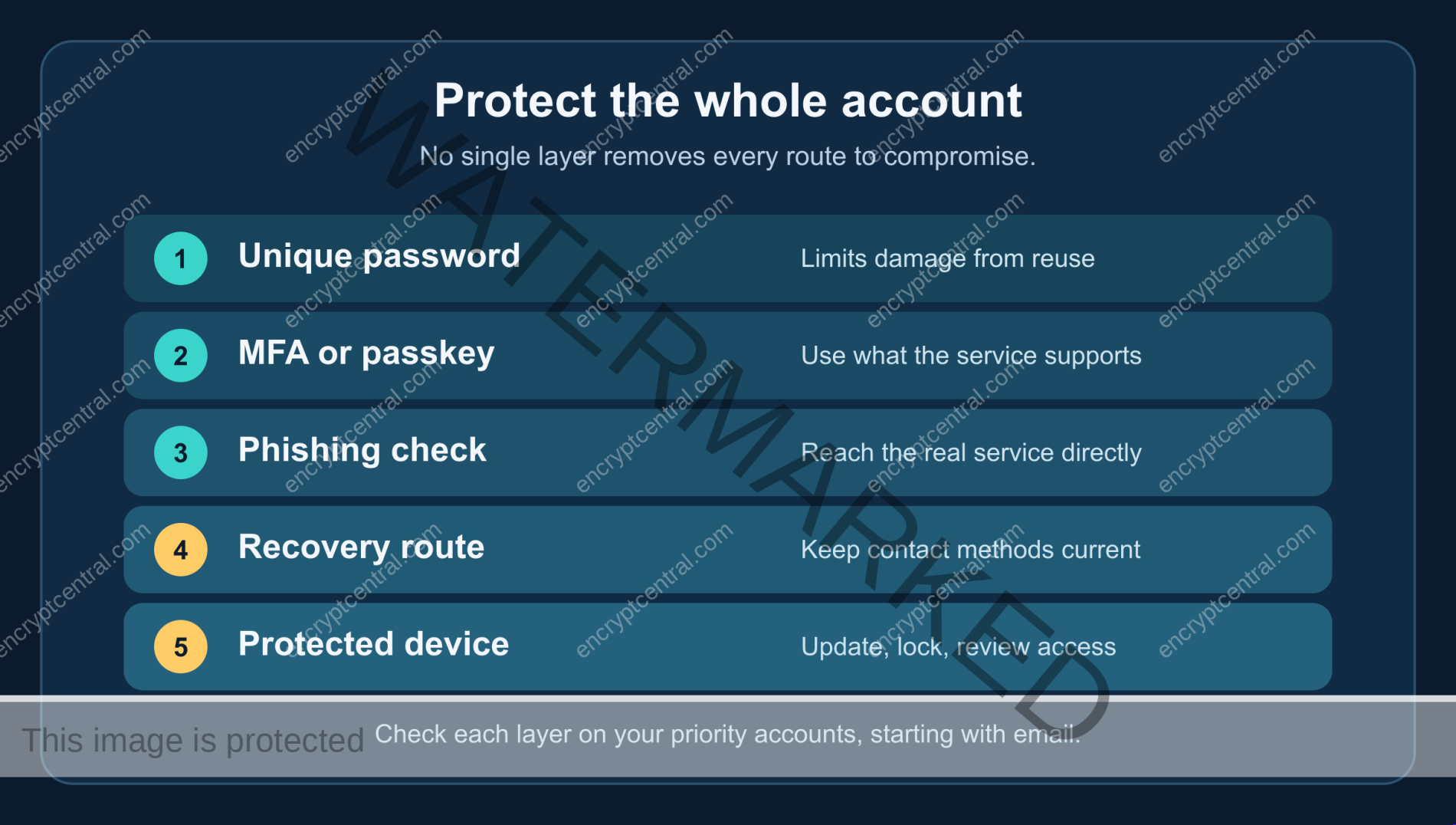
Protect the whole account, not just the password
- Use a different long password for each service; fix reuse on email and financial accounts first.
- Turn on the strongest MFA or passkey option the service actually supports, and prepare a backup method.
- Check the real site before entering a password or one-time code requested by a message.
- Keep devices, recovery email, phone number, and saved recovery codes under your control.
- Know how to review sessions and recover the account if a sign-in looks wrong.
This article is an account-protection sequence for people who already have, or are ready to make, distinct passwords. If you need a repeatable creation method, start with EncryptCentral’s strong-password creation guide. No password, multi-factor method, or product removes all account-takeover risk. The point is to reduce the opportunities for an attacker and make recovery possible.
1. Find the accounts where one compromise would spread
List the accounts that control other accounts: your primary email inbox, password manager or sync account, phone-carrier account, banking and payment services, cloud storage, social accounts, and any work administrator login. You do not need to put secret values in this list. Record the service, the recovery email or phone it uses, whether the password is unique, whether MFA is on, and whether you have a backup sign-in route. Start with email because password-reset links and security notices often arrive there.
Look for password reuse, not merely a weak-looking string. If one password appears at multiple services, change each use to a different value. The Federal Trade Commission explains that credentials exposed at one service can be tried at another. A password manager can help generate and retain distinct values, but it is not necessary to paste the entire list into an unfamiliar online checker. Work from the accounts you control and the service’s own security settings.
Prioritize the accounts with the widest consequences if taken over. A social profile may expose contacts; an email inbox may allow resets for dozens of other accounts; a payment account may hold financial details. Your priorities will differ. A short inventory is useful because it turns vague advice into a sequence you can complete and verify.
2. Add the best available second factor
Open each priority account directly and look for “passkey,” “security key,” “two-factor authentication,” “two-step verification,” or “multi-factor authentication” in its security settings. The service determines which methods are available. Some offer a passkey or security key; some allow an authenticator app; others offer only a text or email code. Follow that service’s enrollment instructions, save any recovery codes, and test a sign-in before you assume the setting works.
The methods are not equivalent. NIST SP 800-63B-4 describes WebAuthn/FIDO2 cryptographic authentication as phishing-resistant because the authentication is bound to the legitimate service. A manually entered one-time code is not phishing-resistant: a convincing false site can ask for the code and relay it. That distinction is about protocol behavior, not a promise that every device or account recovery path is safe. Choose a phishing-resistant option where the service and your devices support one; otherwise, use the strongest available method and remain alert to false sign-in requests.
The FTC says an authenticator app or security key is safer than text or email codes when those stronger options exist, while a text or email code is better than no second factor if that is all a service offers. A blanket instruction to turn off SMS can leave someone with password-only access. If email receives sign-in codes, secure that email account with its own unique password and MFA. Never read a verification code to an unsolicited caller or enter it into a page opened from an unexpected message.
Set up an alternate method before you lose a phone or key. Depending on the service, that could be a second key, a second device, recovery codes, or a verified recovery contact. Keep the backup independent enough that losing one device does not remove every route in. Do not assume a passkey synced to several devices is automatically recoverable if the account that controls that sync is compromised.
3. Treat phishing as a sign-in problem
A message can claim your password has expired, a bill failed, or someone signed in from a new location. The request may look like ordinary account maintenance. Its real goal may be to move you to a false login page or make you disclose a one-time code. A long password can still be typed into the wrong site. FTC phishing guidance recommends contacting the company through a website or number you know is real, not the link or contact details in the suspicious message.
When a message creates urgency, pause and use a known bookmark, an official app already installed, or an address you type yourself. Check the exact domain before entering credentials. A familiar logo or a padlock icon alone does not establish that you reached the intended service. If your password manager does not recognize the domain, treat that as a prompt to inspect the address, not a reason to copy the secret by hand into a lookalike page.
Be just as careful with MFA prompts. Do not approve an unexpected push request. Do not share a one-time code because someone claiming to be support asks for it. If you did enter a password or code into a suspicious page, use a trusted device and the real service’s security flow promptly. Change the exposed password, check sessions and recovery methods, and secure any linked email account. A warning sign is a reason to investigate, not proof that every account is already compromised.
4. Secure the device and the recovery route
Your phone and computer may hold signed-in sessions, passkeys, manager access, email, and recovery messages. Install operating-system and browser updates through their normal update mechanisms. Use a screen lock that is not easy for someone nearby to observe. Review who else can unlock or use the device, including shared household or workplace accounts. If you use a borrowed computer, avoid saving the account or asking it to remember the device, and sign out when finished.
Then inspect the recovery settings on your critical accounts. Is the recovery email still yours? Is the phone number current? Are old devices, app passwords, or backup methods still listed? A stale recovery address can strand you or give an attacker a route around a newly changed password. Where the service provides saved recovery codes, store them securely and away from the device most likely to be lost. NIST’s account-recovery guidance recognizes securely stored offline recovery codes; the particular method and instructions still depend on the provider.
Do not replace this review with a categorical ban on browser-based password managers or a promise that an offline manager has no risk. The meaningful questions are whether your chosen manager and device are protected, how access is recovered, whether the vault is exposed on shared devices, and whether your backup actually works. This article has not tested or ranked managers. NIST expects covered services to allow managers, autofill, and paste, while users still need to evaluate their own storage and recovery setup.
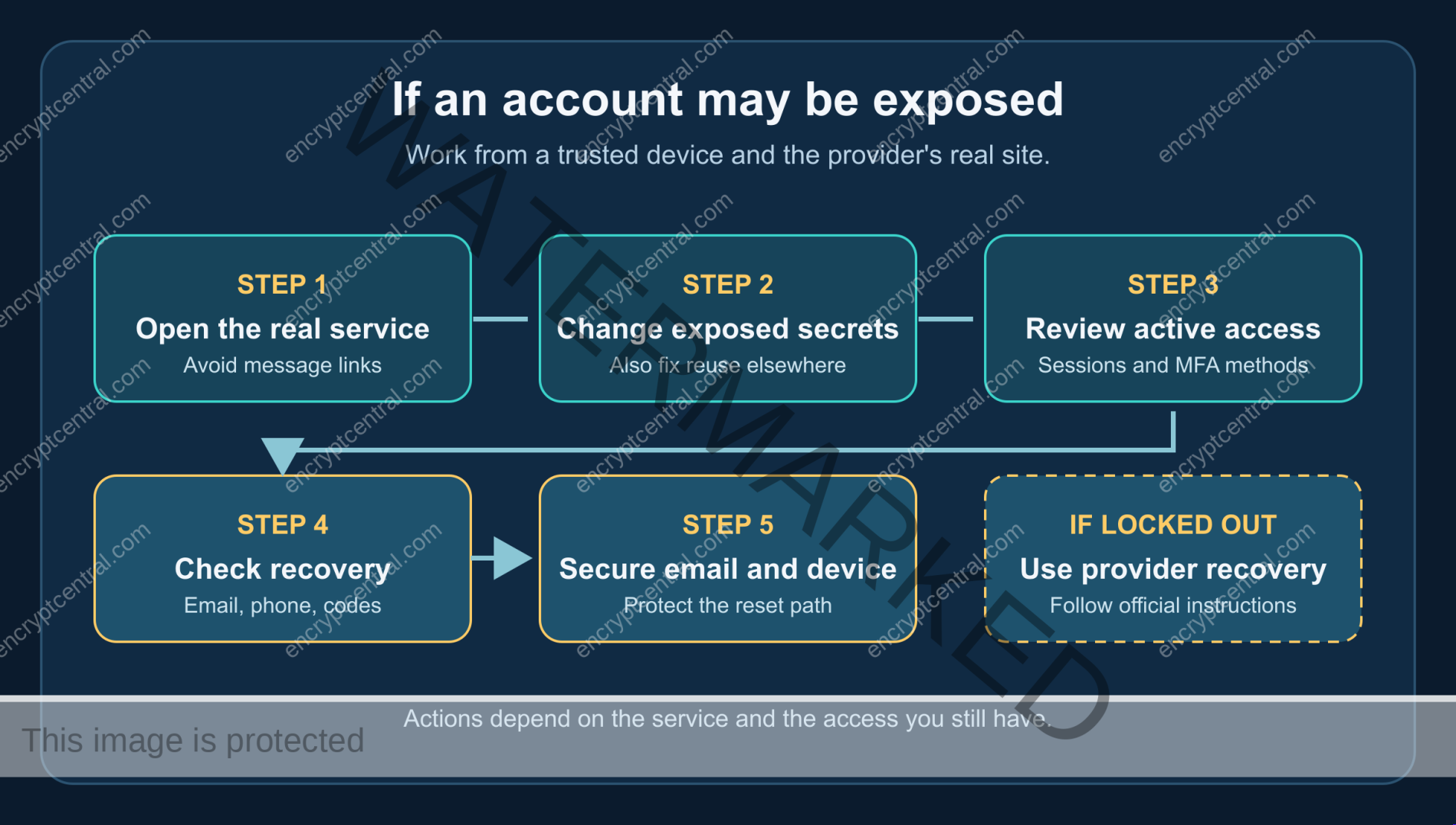
5. Make a response plan for an exposed account
You do not need a corporate incident team to prepare a useful plan. Know where the service lists recent sign-ins or active sessions, how to sign out other devices, how to change your password, how to review MFA methods, and how to contact the provider from its official site. Availability and labels differ by service. Record the provider’s legitimate recovery page or support route before an emergency, without storing a secret in an unsecured note.
If you receive a credible breach notice or notice an unexplained sign-in, start from the provider’s real website or app. Change a known or suspected exposed password and any other account that used the same value. Review and revoke unfamiliar sessions where the service offers that control. Confirm that recovery email, phone, forwarding rules, and MFA methods have not changed without your approval. The FTC’s hacked-account recovery guide is a useful next reference for email and social accounts; specific steps depend on the provider and what access you still have.
If your email account is affected, give it priority. An attacker who can receive reset messages may regain access to other services after you change those services’ passwords. Secure the email, then work outward to accounts that use it for recovery. If you suspect malware or device theft, address the device itself before repeatedly entering new credentials into it. Seek qualified help for work accounts, regulated information, financial fraud, or a device you cannot trust.
How to verify the protection is real
| Control | What to check | Failure to catch |
|---|---|---|
| Unique password | Your own manager or account inventory shows no reuse on priority services. | The same password still opens the recovery email or an old shopping account. |
| MFA or passkey | A controlled sign-in prompts for the intended method, and a backup method is stored safely. | The setting was started but not completed, or the only key is on a lost device. |
| Recovery | Email, phone, devices, and codes are current and under your control. | An old number or unfamiliar recovery address remains attached. |
| Sessions | You know where to inspect active access and how to end a session if supported. | A password change leaves an unwanted active session in place. |
| Phishing check | You can reach the real service independently of an urgent message. | A familiar logo or search result sends you to a false login page. |
Do this check first for email, the manager/sync account, banking, payment, and accounts that administer others. Then move through lower-impact services. Revisit the inventory when you change devices, recovery addresses, or MFA methods. A yearly review of settings can be useful; it is different from forcing a password change every few months without evidence of exposure. NIST’s verifier guidance rejects arbitrary periodic rotation and calls for a change when there is evidence of compromise.
Common mistakes to avoid
- Assuming a complex password cannot be stolen. It can still be phished, reused, or exposed through another route. Protect the sign-in and recovery process.
- Enabling MFA without a backup. A lost device can create a lockout. Set up the service’s supported recovery before you need it.
- Calling every code “phishing-resistant.” Manually entered codes can be relayed by a false site. Prefer service-bound cryptographic methods where available.
- Ignoring the recovery email. It may be the easiest route for resetting other accounts.
- Treating a manager as either perfectly safe or categorically unsafe. Compare your realistic choices, secure the device and vault, and verify recovery.
Bottom line
You cannot ensure that a password will never be stolen, but you can make one stolen credential less useful. Use a unique password, the strongest practical second factor, a trusted route to the real site, current recovery methods, and a plan to inspect access after a warning. Creating the password is only the first step; the account defenses on this page are the next layer.