


Direct answer: Migrate to passkeys in stages, not with a tenant-wide switch. First inventory sign-in paths, devices, users, recovery workflows, and legacy dependencies. Then choose which passkey types meet each risk level, secure registration and recovery, pilot with a bounded group, measure both security and usability, and only retire passwords or phishable MFA after every required path has been tested. Passkeys can remove a major phishing target, but a weak enrollment or recovery process can reintroduce the same account-takeover risk through a different door.
What to decide before you enable passkeys
- Which applications and user groups are actually ready.
- Whether synced, device-bound, or both passkey types are acceptable.
- How users will enroll without a stolen password becoming the bootstrap credential.
- How users, administrators, contractors, and shared-device workers recover access.
- Which legacy methods stay temporarily, who may use them, and when they will be retired.
A passkey is a public-key credential used through WebAuthn/FIDO. During registration, an authenticator creates a key pair for a specific relying party. The service stores the public key; the private key stays under the authenticator’s control. During sign-in, the authenticator signs a fresh challenge after the user approves the action, often by unlocking a device with a PIN, pattern, fingerprint, or face. The local unlock does not send a biometric template to the website.
The current W3C WebAuthn Level 3 Recommendation, published in August 2026, describes credentials that are scoped to a relying party. That scope is the security advantage organizations should care about: a passkey created for the legitimate domain cannot simply be typed into a lookalike phishing page. NIST SP 800-63B-4 recognizes WebAuthn/FIDO2 as phishing-resistant through verifier-name binding and explicitly distinguishes it from manually entered one-time codes, which are not phishing-resistant.
That does not make passkeys a complete identity program. Session theft, compromised endpoints, malicious browser extensions, fraudulent help-desk recovery, poorly controlled device enrollment, and excessive application permissions remain real problems. The migration has to strengthen the whole authentication lifecycle, not only replace the password box.
Start with the three meanings of “passwordless”
Teams often use one word for three different operating states. Mixing them creates policy gaps.
- Passkey available: a user can register and use a passkey, but passwords and older MFA methods still work.
- Passkey preferred: the normal sign-in flow presents a passkey first, while controlled fallback remains for compatibility or recovery.
- Password removed: the account has no usable password path for ordinary sign-in. Recovery and emergency administration still need separate, documented controls.
For most organizations, the safe first objective is passkey preferred for a well-supported cohort. Password removal is a later decision based on measured coverage, recovery quality, and application compatibility. A console setting labeled “passwordless” does not prove that every protocol, mobile app, remote session, service account, or support process has stopped accepting a password.
Choose synced and device-bound passkeys by risk
Passkeys are not one assurance class. A synced passkey can be encrypted and made available across devices through a passkey provider. A device-bound passkey remains on a particular device or hardware security key. The right choice depends on the consequence of account compromise, who controls the devices and sync account, and how much recovery friction the organization can sustain.
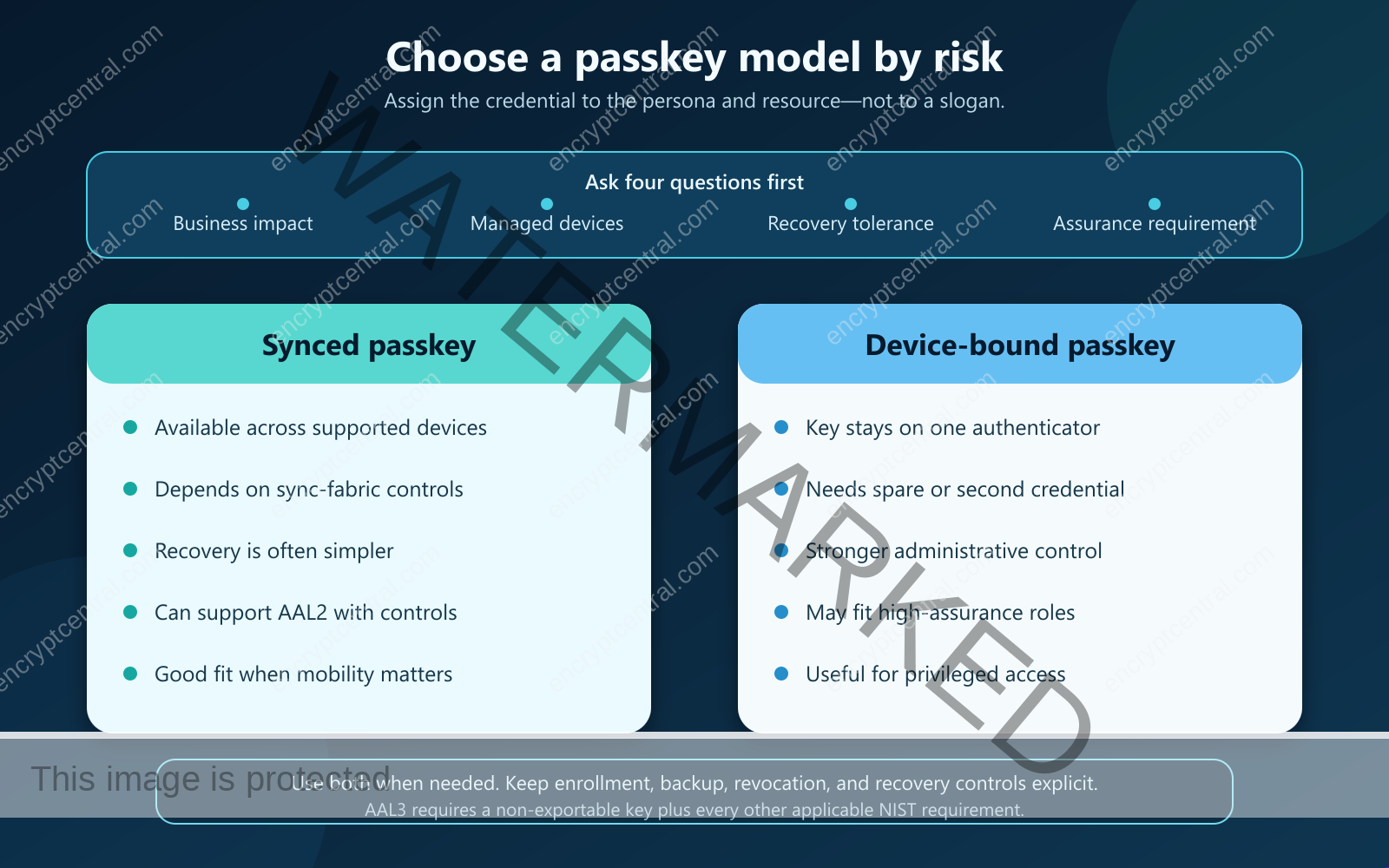
| Decision area | Synced passkey | Device-bound passkey |
|---|---|---|
| Availability | Can follow a user across supported devices in the same provider ecosystem. | Requires the registered device, security key, or an additional separately registered authenticator. |
| Recovery | Can reduce device-loss lockouts when the sync account and provider remain available. | Requires a backup authenticator, additional device registration, or a controlled recovery process. |
| Administrative control | Depends partly on the sync provider, managed account, and device controls. | Can provide tighter control over where the private key is held. |
| Higher assurance | NIST permits syncable authenticators at AAL2 when its controls are met, but not at AAL3 because the key is exportable. | A non-exportable hardware-backed implementation may support higher-assurance designs when every other requirement is met. |
| Typical fit | General workforce or customer access where cross-device availability matters. | Privileged administrators, regulated work, shared-device scenarios, or roles requiring managed hardware. |
The NIST syncable-authenticator appendix requires controls around encryption, local private-key operations, sync-account protection, and enterprise management. It also warns that organizations accepting subscriber-provided authenticators may have limited visibility into the sync fabric. The FIDO Alliance likewise advises relying parties to keep alternative authentication or recovery options because both synced and device-bound users can lose access.
Do not turn the comparison into a false choice. Many organizations will use synced passkeys for lower- and moderate-risk work, device-bound credentials for privileged roles, and a small, separately governed emergency-access path. Write the policy by persona and resource sensitivity rather than trying to force one authenticator type across every employee, application, and device.
Run a readiness assessment before the pilot
Create a migration inventory with one row for each sign-in path, not merely each application name. Record the identity provider, relying-party domain, browser or native client, operating systems, device ownership, remote-access path, shared-device use, embedded web views, legacy protocols, offline requirements, federation, support owner, and current recovery method. Include administrator portals and break-glass access. A green check beside the main web application is not evidence that every path is ready.
Then answer these questions:
- Identity: How is the person verified before the first passkey is bound? Can a stolen password or intercepted email alone enroll a new authenticator?
- Devices: Are operating systems, browsers, screen locks, device encryption, patching, and management controls adequate for the selected passkey type?
- Applications: Which apps support the central identity provider, and which still authenticate locally or through a legacy protocol?
- People: Which users work on shared terminals, restricted mobile devices, unmanaged endpoints, remote desktops, or accessibility configurations?
- Assurance: Which resources require a device-bound credential, attestation, managed hardware, or a phishing-resistant authentication strength?
- Operations: Can the service desk verify identity, invalidate a lost authenticator, issue a temporary bootstrap method, and notify the user without improvising?
- Evidence: Can you report who enrolled, which method was used, failed registrations, recovery events, fallback use, and remaining password sign-ins?
Mark each path ready, pilot-only, exception, or blocked. A blocked critical workflow is a reason to retain a controlled fallback while the dependency is repaired; it is not a reason to call the whole tenant passwordless.
Use a seven-stage migration
1. Define the policy and success measures
Write the target state in operational terms. Specify acceptable passkey types by user group, resources that require phishing-resistant authentication, device-management expectations, attestation rules where justified, and the conditions for retaining or removing legacy methods. Define success before enabling anything: enrollment coverage, successful passkey sign-ins, fallback rate, recovery volume, recovery completion time, lockouts, help-desk contacts, and unauthorized enrollment attempts.
2. Secure bootstrap and registration
The first binding is a high-risk event. Require an existing strong method, a time-limited administrator-issued bootstrap credential, verified device context, or another process appropriate to the account’s assurance level. Do not allow possession of a compromised password to become enough to create the credential that replaces it. Send an independent notification when a passkey is added, and give the user a clear way to report an unauthorized change.
NIST’s authenticator lifecycle guidance requires records of bound authenticators and significant lifecycle events, strong authentication when adding an authenticator, notifications, and prompt invalidation after loss or compromise. Those controls are useful beyond federal systems because they close the gap between cryptographic strength and daily operations.
3. Build recovery before enrollment
Require at least two separate ways to regain access where the risk model allows it. That may mean two passkeys, a managed security key plus a platform credential, protected recovery codes, a verified recovery contact, repeated identity proofing, or an administrator-issued temporary access process. Avoid a fallback that silently returns every account to email-only or SMS-only recovery without rate limits, notifications, and fraud review.
Test device loss, phone replacement, passkey-provider loss, employee termination, administrator lockout, accessibility support, and recovery from a device that cannot use the original passkey provider. The test should end with a new authenticator bound, the lost authenticator invalidated, the user notified, and an auditable record—not merely a support ticket marked closed.
4. Pilot with a representative cohort
Choose a group large enough to expose real variations but small enough to support closely. Include different operating systems, browsers, locations, device ownership models, and accessibility needs. Privileged administrators are high value but should not be the only pilot population; their managed devices and technical familiarity may hide problems that affect ordinary workers.
Keep legacy sign-in available under a named exception during the pilot. Log its use and ask why it was needed. The point is to discover gaps, not to manufacture a perfect adoption number by removing the exit before the bridge is tested.
5. Verify sign-in, management, and revocation
Test registration, first sign-in, repeat sign-in, cross-device use, multiple accounts on one device, device replacement, authenticator deletion, lost device, account disablement, role change, and offboarding. Confirm that the service shows users their registered authenticators in understandable language and that administrators can see the evidence needed to investigate an event.
For Microsoft environments, current Microsoft Entra passkey guidance exposes policy choices for synced and device-bound passkeys, target groups, attestation, and authentication strength. Google Workspace’s current passwordless administrator guidance separates allowing passkeys from allowing users to skip passwords and includes enrollment and sign-in reporting. These are examples of why the actual tenant must be checked: vendor controls, editions, defaults, and rollout states change.
6. Expand by persona, not by enthusiasm
Move from pilot to broader groups only when their device and application patterns are understood. Prepare short instructions that explain where the passkey is saved, what the local biometric or PIN does, how to add a backup, and whom to contact. Train support staff with the same scenarios used in the recovery test. For shared or kiosk devices, use an authenticator model designed for that workflow rather than asking users to create personal credentials on communal endpoints.
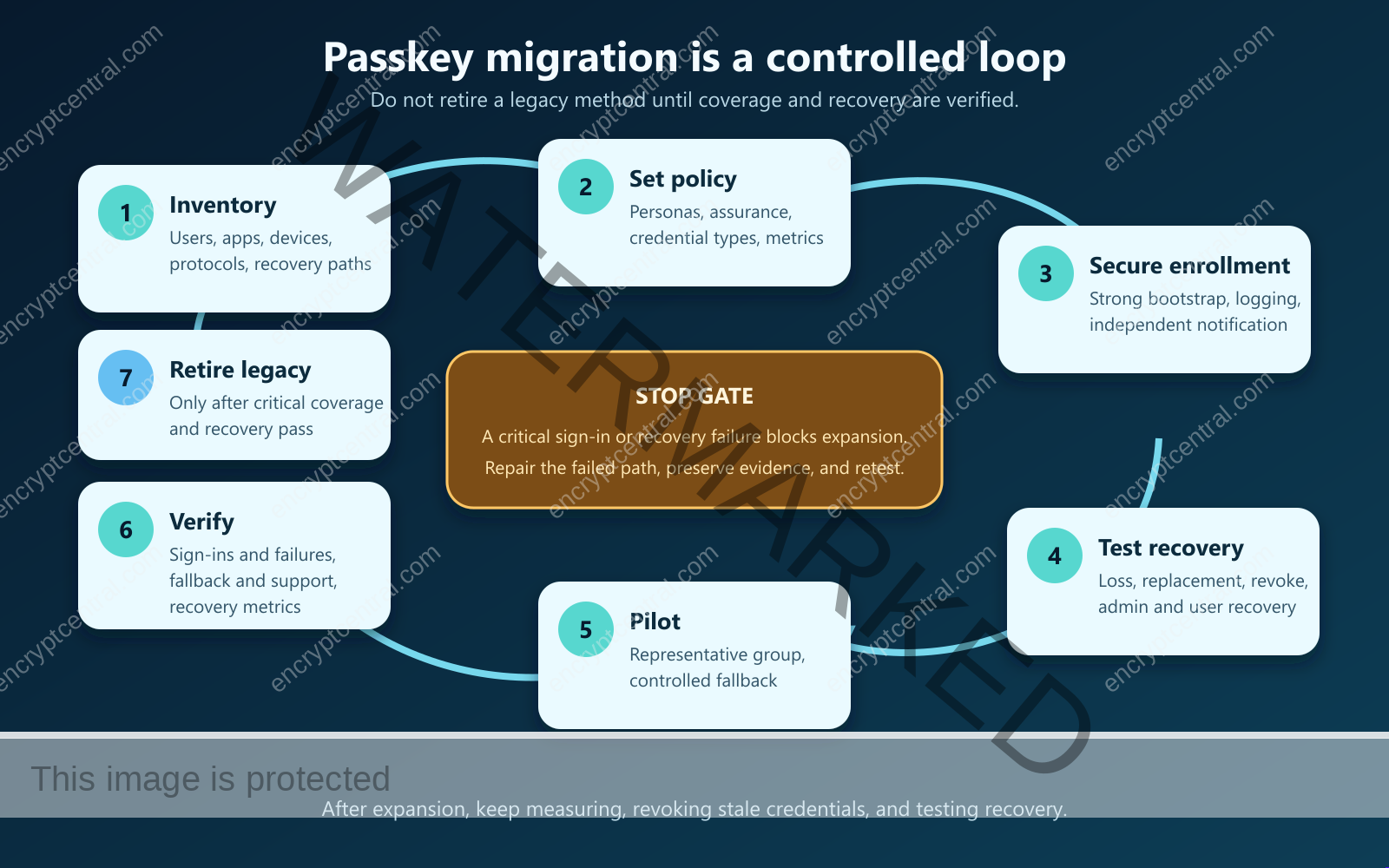
7. Retire phishable methods with evidence
Reduce or remove passwords, SMS codes, email codes, or push approvals only after reports show that the required population can authenticate, recover, and complete every critical workflow. Apply the change in bounded policy groups, monitor closely, and keep emergency access separate from ordinary fallback. An emergency account should be tightly controlled, monitored, and regularly tested; it should not become a convenient bypass for routine failures.
Verify the migration with outcomes
A completed configuration job is not a completed migration. Build a weekly scorecard during rollout and a monthly one after stabilization. At minimum, track:
- eligible users, enrolled users, and users with at least two recovery-capable authenticators;
- successful passkey sign-ins by platform and application;
- password, OTP, push, and other fallback sign-ins;
- registration failures, abandoned prompts, and unsupported-device events;
- recovery cases, method used, completion time, fraud escalations, and notifications sent;
- lost, revoked, or stale authenticators;
- help-desk volume and repeat contacts;
- critical applications or protocols still blocking retirement of legacy methods.
Set a review threshold before enforcement. For example, a group may be ready only when every critical path passes, recovery has been exercised, administrators retain tested emergency access, the fallback rate is understood, and unresolved exceptions have owners and deadlines. The exact numbers depend on the organization; the important control is that they are chosen before the result is known.
Common failure modes
Enabling passkeys without changing enrollment
If an attacker with a stolen password can register a passkey, the organization has created persistence for the attacker. Strengthen the bootstrap path, notify on enrollment, and investigate unexpected authenticator additions.
Calling a local biometric a server-side identity check
A fingerprint or face commonly unlocks the authenticator locally. It does not, by itself, tell the relying party that a government identity was verified. Keep device unlock, authenticator assurance, and identity proofing as separate concepts.
Deleting passwords before testing recovery
Users will replace phones, lose security keys, change platforms, and forget where a credential was saved. If recovery has not been tested, removing the old method converts a security project into an outage or encourages support staff to invent exceptions.
Ignoring shared devices and contractors
A passkey design that works on a personally assigned laptop may fail on a frontline terminal, lab workstation, call-center desktop, borrowed device, or contractor-owned endpoint. Assign an authenticator pattern to each persona and document who owns it at offboarding.
Leaving fallback invisible
A migration can look successful while attackers and frustrated users continue to choose the old path. Log fallback use, require a reason where practical, review it by application and cohort, and shrink exceptions deliberately.
Decision: migrate when the lifecycle is ready
Passkeys are a strong replacement for phishable sign-in methods because WebAuthn binds each credential to the legitimate relying party and keeps a reusable secret out of the login form. The migration succeeds, however, only when registration, devices, application compatibility, recovery, revocation, monitoring, and support are designed as one system.
Start with a representative pilot and a written assurance policy. Give every user an appropriate backup or recovery route. Verify actual sign-ins and actual recovery. Expand by persona. Retire legacy methods only when the evidence shows that the new path works without opening a weaker fallback. That is the difference between enabling a feature and completing a passwordless migration.
Primary references
- Web Authentication Level 3 Recommendation — W3C
- NIST SP 800-63B-4 — NIST
- Implementing Phishing-Resistant MFA — CISA
- Enterprise Passkey Deployment Resources — FIDO Alliance
Related posts:
 What Is Two-factor Authentication, And Should I Use It?
 What Is Multi-factor Authentication, And How Does It Enhance Security?
 Preventing and Mitigating Prompt Injection Attacks: A Practical Guide
 Building Complete AI Security Solutions: Your Comprehensive Implementation Guide
 Software Supply Chain Security and SBOM Buyer Guide
 Smishing, Vishing, and Mobile Phishing Response Guide


