


There is no single strongest prevention against every cyber threat. The first useful action depends on what you are protecting, how an attacker could reach it, what a failure would cost, and which safeguards are already working. For a person, securing the email account that resets everything else may be the best starting point. For a small organization, an exposed administrator account or an unpatched critical service may deserve attention first. Neither example is a universal ranking.
This guide helps you make that first decision. It is a prioritization guide, not a substitute for an implementation plan. If you already know your first priority and need to assign owners, configure controls, and check that they work, continue to the layered cyber-attack defense guide. The two questions are related, but answering “where do I start?” is different from operating a complete security program.
Start with the thing you cannot afford to lose
Before comparing tools, name one account, service, dataset, or business process whose loss would cause a serious problem. For an individual, that might be the primary email inbox, a financial account, or the account used to synchronize a password manager. For a business, it might be the identity service that controls employee access, an order-processing system, customer records, or the backup environment needed to resume work. You do not need to publish this inventory or put secrets into a worksheet. A plain list of the systems and their owners is enough to begin.
Then ask what would happen if that item were inaccessible, altered, or controlled by someone else. Would you lose the ability to recover other accounts? Could customers be affected? Could staff still perform the essential task? This impact question stops a common mistake: spending time on the most visible security product while a less visible account controls the whole environment.
NIST’s Cybersecurity Framework FAQ describes prioritization in terms of business or mission needs, risk tolerance, resources, and the gap between current and desired outcomes. That is why a universal “strongest control” claim would be misleading. The framework is a way to choose and communicate outcomes; it does not award a single tool the top spot for every person or organization.
Choose the personal or organizational path
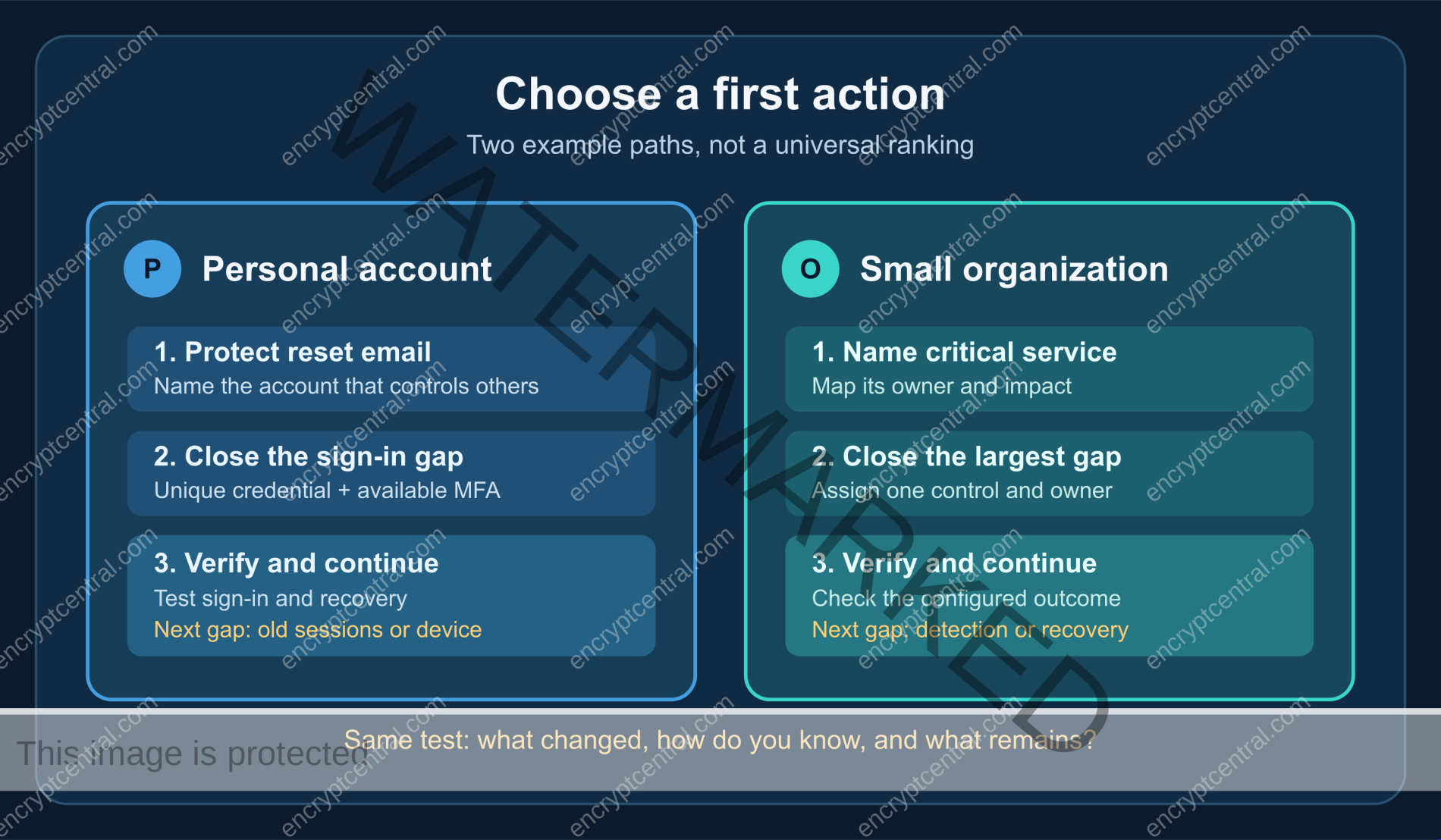
The starting questions differ depending on who controls the system. You can secure your own accounts and devices directly. An organization also needs to know who owns each system, who can change it, and who will verify a control after it is introduced. Use the path that matches your decision authority; do not treat a consumer account checklist as a complete business security plan.
| Situation | First question | Reasonable first action to examine | Evidence it worked |
|---|---|---|---|
| Your personal email resets other accounts. | Could someone with the password or recovery method take it over? | Use a unique credential and the strongest available second factor you can recover. | The setting is active, a controlled sign-in succeeds, and recovery details are current. |
| Your phone or computer holds many signed-in accounts. | Are updates and device access protections actually enabled? | Install available security updates and review the device lock and account sessions. | The device reports the update installed and unwanted access can be ended. |
| A business relies on one cloud administrator. | Who else can administer the service, and what happens if that identity is lost? | Review privileged access, available MFA, and a documented recovery route. | An owner can show the access list, enrollment state, and a tested recovery procedure. |
| A business runs a critical internet-facing service. | Who owns its updates and knows whether a vendor fix was applied? | Confirm supported versions, exposure, patch ownership, and a remediation check. | The owner can show the version, change record, and follow-up verification. |
These examples are decision prompts, not an ordered list of threats or a claim that every organization has the same architecture. If you are responsible for a regulated system, safety-critical operation, or incident already in progress, use your organization’s procedures and qualified support.
If you are protecting your own accounts
Secure the account that controls the others
Start with your primary email or another account that can reset passwords for many services. Check its current recovery email and phone, devices with active sessions, and available sign-in methods. Replace a reused or exposed password with a unique one. If you need a repeatable creation method, use the strong-password creation guide; this page does not need to repeat a full password recipe.
Turn on two-factor authentication where the service offers it. The Federal Trade Commission’s account guidance recommends starting with sensitive accounts and explains that methods differ. A security key or authenticator app may be available; some services offer only text or email codes. Do not turn off the only usable second factor simply because a stronger option is unavailable. Keep a backup sign-in or recovery route under your control and check the service’s own instructions before relying on it.
Verification matters. Complete enrollment, sign out of a controlled session, and confirm that a new sign-in prompts for the intended factor. Check the recovery route without exposing codes in a shared document. A screen that says “MFA enabled” is useful evidence, but the practical test is whether you can still enter legitimately and whether an unexpected sign-in is harder.
Close an obvious device gap next
Review the devices used for those accounts. The FTC’s personal-information guidance recommends timely software updates and automatic updating for operating systems, browsers, apps, and security software where appropriate. Verify that an update actually installed; a pending restart can leave a device behind. A device lock and a way to remove an old signed-in session matter too, because even a strong password cannot undo access already present on a lost or shared device.
Do not mistake these steps for a promise of safety. A phishing page can still ask for a code, recovery can be manipulated, and a device may have other vulnerabilities. The next task is to protect the whole account beyond the password, including phishing checks and recovery. Keep the present decision small: identify one high-impact account or device gap, fix it, and verify the change.
If you are choosing a first business security action
Make a short critical-service map
List the few services that let the organization operate: identity and email, payment or order systems, customer-data stores, internet-facing applications, and the systems needed to restore them. For each, record a business owner, technical owner, provider or vendor, and the effect of a day of unavailability or unauthorized access. This is not a complete asset inventory. It is a first pass that reveals where a control failure would spread.
NIST’s small-business CSF 2.0 resources are meant to help organizations with modest or no cybersecurity plan start managing risk. A small team can use that approach without claiming a certificate or declaring itself “CSF compliant.” Write down the present condition, the condition you need, and who can close the gap. If you do not know who administers a critical service or who receives its alerts, that ownership gap may be the first issue to resolve.
Compare the plausible first gaps
For each critical service, ask four questions: How exposed is it to misuse? What would failure affect? Which protective or recovery controls already work? Can the proposed first action be completed and verified by a named owner? An action that is urgent but unowned is not ready. Assign an owner and a check before counting it as a priority.
Consider a small firm with a shared cloud administrator login, a managed firewall, and weekly backups that nobody has restored. It would be tempting to buy another network appliance because the firewall is visible. The more immediate decision may be to remove shared administration, enroll appropriate MFA, and establish a recovery route for the identity service. But the untested backup remains a serious resilience gap. The exact order depends on the firm’s exposure and consequences; this example illustrates the questions, not a measured ranking of controls.
Separate prevention from readiness and recovery
Identity controls, configuration, updates, and restricted exposure can reduce opportunities for initial compromise. Monitoring can help reveal suspicious activity. Response procedures can limit damage after discovery. Backups and restore tests support recovery. These roles overlap in practice, but they are not interchangeable. A backup does not stop an attacker from signing in; a firewall cannot prove an old session was revoked; an MFA enrollment screen does not show that a restore will work.
The NIST Cybersecurity Framework 2.0 groups outcomes into Govern, Identify, Protect, Detect, Respond, and Recover. Treating all six as part of the risk-management picture is more useful than calling a recovery measure “prevention” or expecting a protective tool to handle an incident by itself. Once the first gap is chosen, the organizational layered-controls guide can carry the implementation detail.
Use a simple first-action decision record
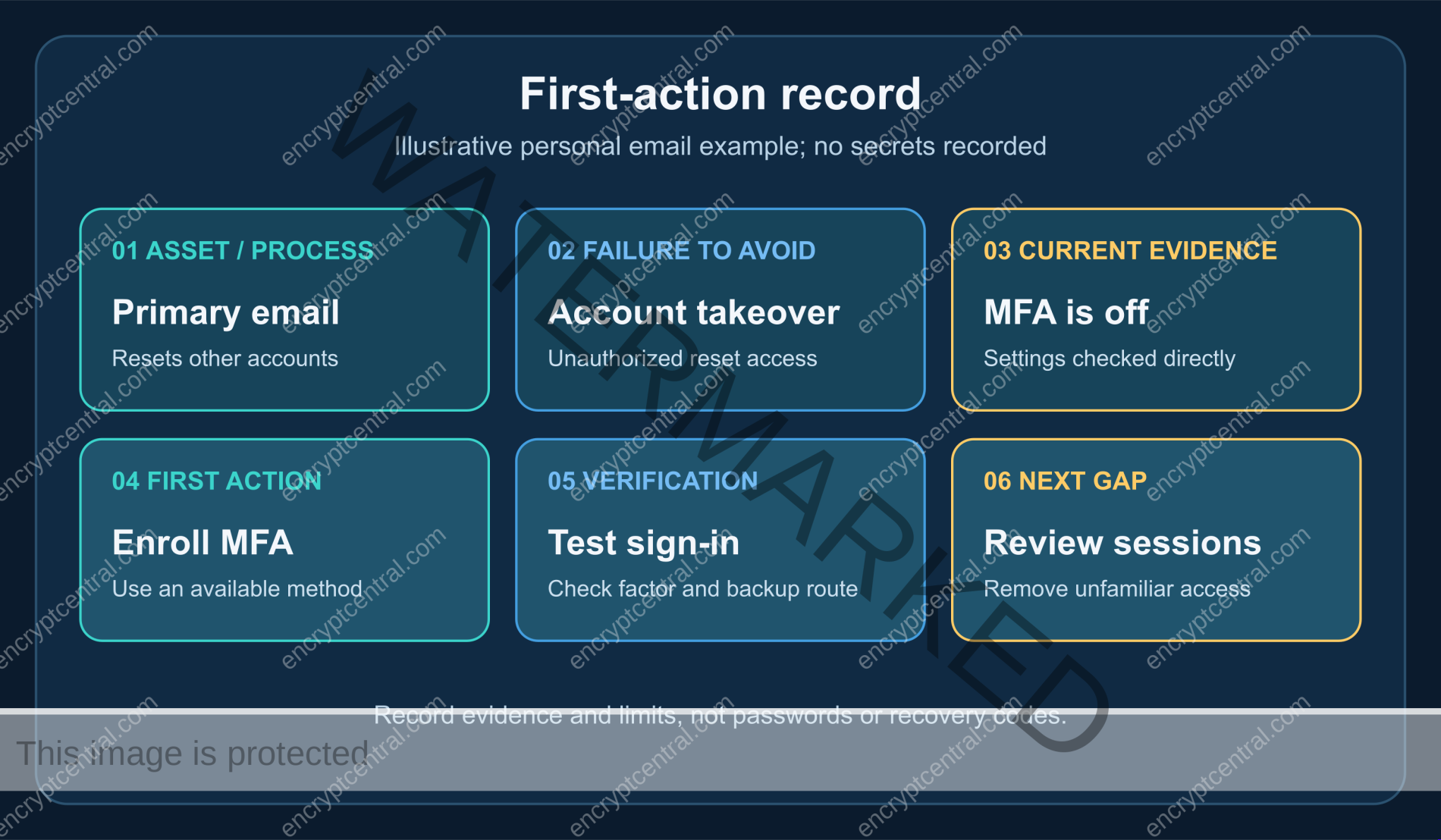
A one-page record makes the choice reviewable. It also prevents a different person from quietly redefining “done” after a purchase or configuration change. Record the decision in ordinary language, without passwords, recovery codes, or sensitive configuration details:
- Asset or process: What matters, and who owns it?
- Failure to avoid: Unauthorized access, loss of availability, altered data, or inability to recover?
- Current evidence: What setting, version, log, owner list, or test shows the present state?
- First action: What will change, and who is responsible?
- Verification: How will you know the change works, including any recovery path?
- Next gap: What remains outside this action?
For a personal account, the record may be private and brief: “Primary email; unique password and second factor enrolled; recovery email confirmed; controlled sign-in tested; next, review old sessions.” For a business, it might be: “Cloud administration; named owner; shared access removed; privileged users enrolled in supported MFA; access list reviewed; next, test restoration of the dependent service.” The examples do not require a vendor or expose a secret.
Know when to change the first priority
A prioritization decision is not permanent. Reassess when a provider warns of a security issue affecting your service, a previously unknown administrator appears, a device is lost, a recovery method changes, or an essential service cannot be restored. A suspected compromise is not the time to continue a routine improvement checklist unchanged. Use a trusted route to the service or your incident-response process, preserve relevant evidence, and get qualified assistance where the consequences warrant it.
For an organization, review the decision after a major system change, vendor change, or credible incident. The question is not whether a control remains fashionable. It is whether the asset, exposure, impact, and evidence still support your first action. A threat report may provide context, but it cannot replace the local facts about your accounts and services.
Common mistakes that make a priority list less useful
- Calling a control “the strongest” without defining the threat. MFA helps with many credential-abuse paths, but it does not install software updates or restore a damaged system.
- Starting with a product instead of an outcome. A tool purchase does not tell you who configures it, what gap it closes, or how you will check it.
- Repeating old password rules. A mandatory character recipe and calendar-based rotation are not a substitute for uniqueness, account protection, and a response to actual exposure. Use the dedicated password guide for the full method.
- Counting backups as a barrier to initial access. Backups can reduce loss and downtime when they are protected and restorable. They do not prevent the first unauthorized sign-in.
- Marking a setting complete without testing it. Enrollment, patch application, alert routing, and restoration each need a check appropriate to the service.
- Using a consumer checklist as a complete business program. Organizations also need owners, supplier visibility, documented decisions, monitoring, response, and recovery.
The best first defense is a verified next action
Pick one high-impact account or service, name the failure that concerns you, and inspect the protection that exists today. Choose a change you can complete, assign an owner if it is a business system, and verify the result. Then record the next gap. This approach will not eliminate cyber risk or prove that one control blocks the most attacks, but it gives you a defensible starting point—and a way to know when to move on.
Related posts:
 The AI Security Crisis: Why Traditional Cybersecurity Falls Short Against Modern AI Threats
 What Are The Difficulties In Defending Against Cyber Attacks?
 How Do Companies Protect Against Cyber Attacks?
 Why Is It Difficult To Defend Against Cyber Attacks?
 How Can I Detect And Prevent Insider Threats?
 The Future of AI Security: Emerging Trends and Next-Generation Threats


