

SaaS audit logs can disappear while an investigation, insurance request, or internal review is still taking shape. Preserving them requires more than clicking Export. You need to know which records the subscription actually provides, how long each event family remains available, whether the interface truncates or paginates results, and whether the saved file can still be opened and interpreted later.
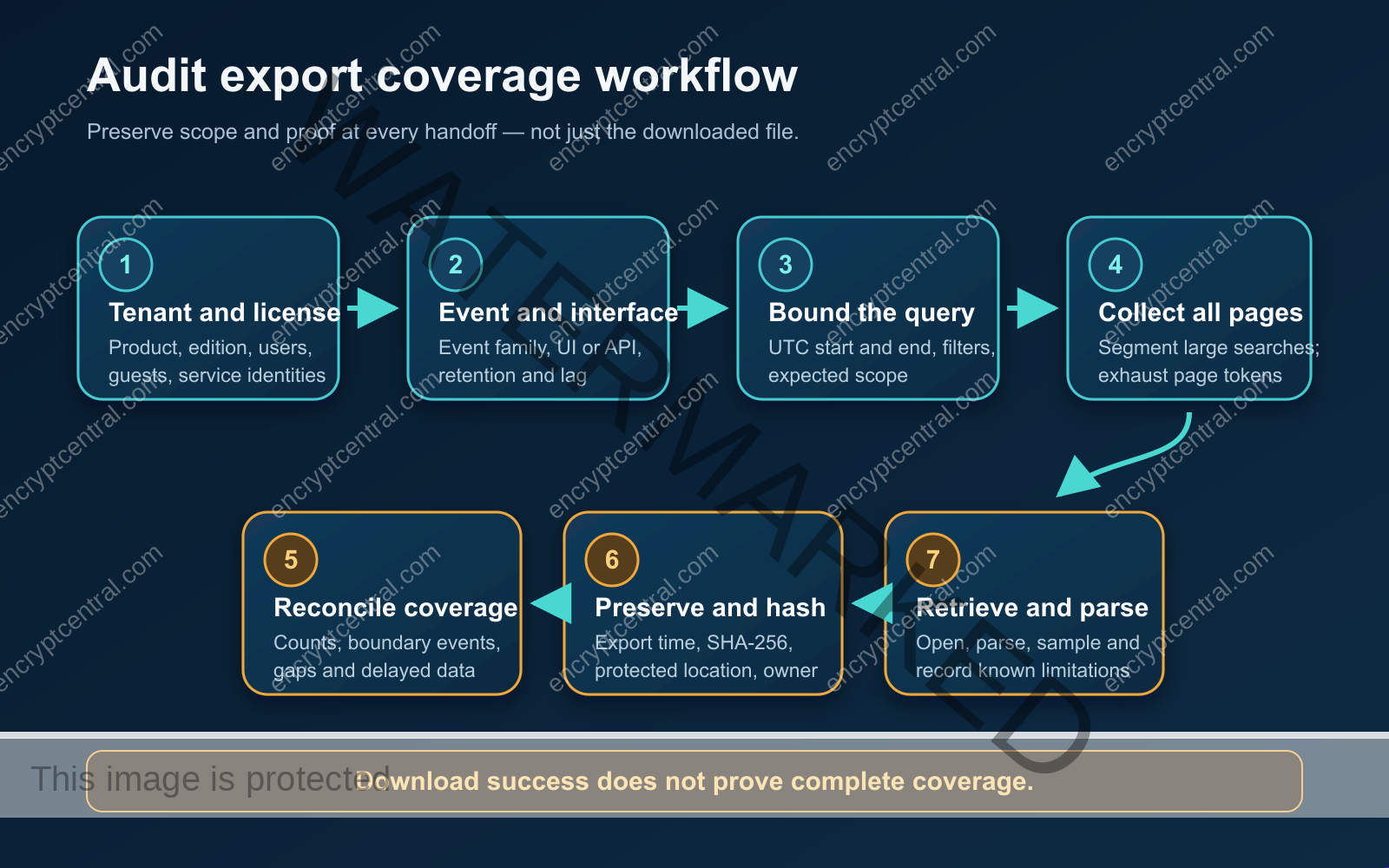
The practical answer is to treat a SaaS audit log export as a controlled evidence-preservation job. Define the tenant and event scope, query a bounded time range, collect every segment or page, reconcile the returned coverage, record the relevant timestamps, hash the files, store them in a protected location, and perform a retrieval-and-parse check. A successful download is only one step in that chain.
This guide explains that workflow using current Microsoft 365 and Google Workspace documentation as concrete examples. It does not claim that every SaaS product works the same way, and it does not replace legal advice or a formal forensic procedure.
Why a SaaS audit log export needs its own checklist
Audit availability is conditional. Product edition, assigned licenses, identity type, workload, event family, retention policy, reporting lag, and the interface used to retrieve the data can all change what you receive. That is why a statement such as “our logs last one year” is not useful unless it names the records, users, policy, and export path covered by that claim.
The UK National Cyber Security Centre advises cloud customers to understand what audit information is available, in what format, how quickly it arrives, and how long it is retained. Customers should also decide whether that information is sufficient for investigations and protect it against unauthorized access. The joint event-logging guidance published by the Australian Signals Directorate and international partners similarly emphasizes structured logs, trustworthy timestamps, investigation-informed retention, centralized access where appropriate, and protection from modification or deletion.
Those principles lead to a simple operating rule: preserve both the records and the context needed to evaluate them. A CSV or JSON file without its tenant, query, time range, pagination history, and limitations is much harder to trust or use.
Start with the exact tenant, entitlement, and event family
Before exporting anything, create a short scope record. At minimum, identify:
- the SaaS provider, product, tenant or organization, and administrative domain;
- the subscription edition and relevant add-on licenses;
- the people, guests, administrators, service identities, and applications in scope;
- the event family or workload, such as sign-ins, administrative activity, email, file access, or sharing;
- the retrieval interface, including the admin portal, API endpoint, command-line tool, or vendor integration;
- the documented retention and expected reporting lag for that event family;
- any tenant-specific retention policy or configuration; and
- the accountable person who requested and performed the preservation.
This inventory is not paperwork for its own sake. It prevents a license assumption for one user group or workload from being generalized to the entire tenant. It also makes later gaps easier to explain. If you are building the broader control environment, EncryptCentral’s guides to a Microsoft 365 security baseline and a Google Workspace security baseline can help identify adjacent settings that deserve review.
Microsoft 365: retention depends on more than the product name
Microsoft’s current Purview auditing overview says Audit Standard generally retains audit records for 180 days. It also notes that logs generated before October 17, 2023, used a 90-day default. Audit Premium can provide a one-year default for qualifying users and specified workloads, but that statement needs careful qualification.
Microsoft’s audit retention policy documentation ties the one-year default to applicable E5 or add-on licensing and to Microsoft Entra ID, Exchange, OneDrive, and SharePoint records. Users without the qualifying license, including guests, generally remain subject to the 180-day default. Non-user entities and other workloads can also follow different conditions. Custom retention policies may extend selected records, but policy changes do not retroactively extend items that were already committed under a shorter period.
So the useful preservation question is not “Do we have Audit Premium?” It is “Which in-scope identities and workloads receive which retention under the licenses and policies active when these events were generated?” Save the answer with the export.
Google Workspace: retention and lag vary by data type
Google’s official data retention and lag table lists different availability windows for audit and investigation data. Many audit log families are available for six months, but that is not a universal Google Workspace retention period. Other reports and interfaces have different windows; email log search, for example, is listed separately with a 30-day period.
The same table documents reporting lag by event family. Google warns that some events can arrive later than the stated time and, in rare cases, might not be reported. Administrators cannot change the listed availability periods. For time-sensitive preservation, record when the event occurred and when it became visible, if you can determine both. A search run too soon may undercount recent activity, while a search run too late may fall beyond retention.
Record four timestamps, not one
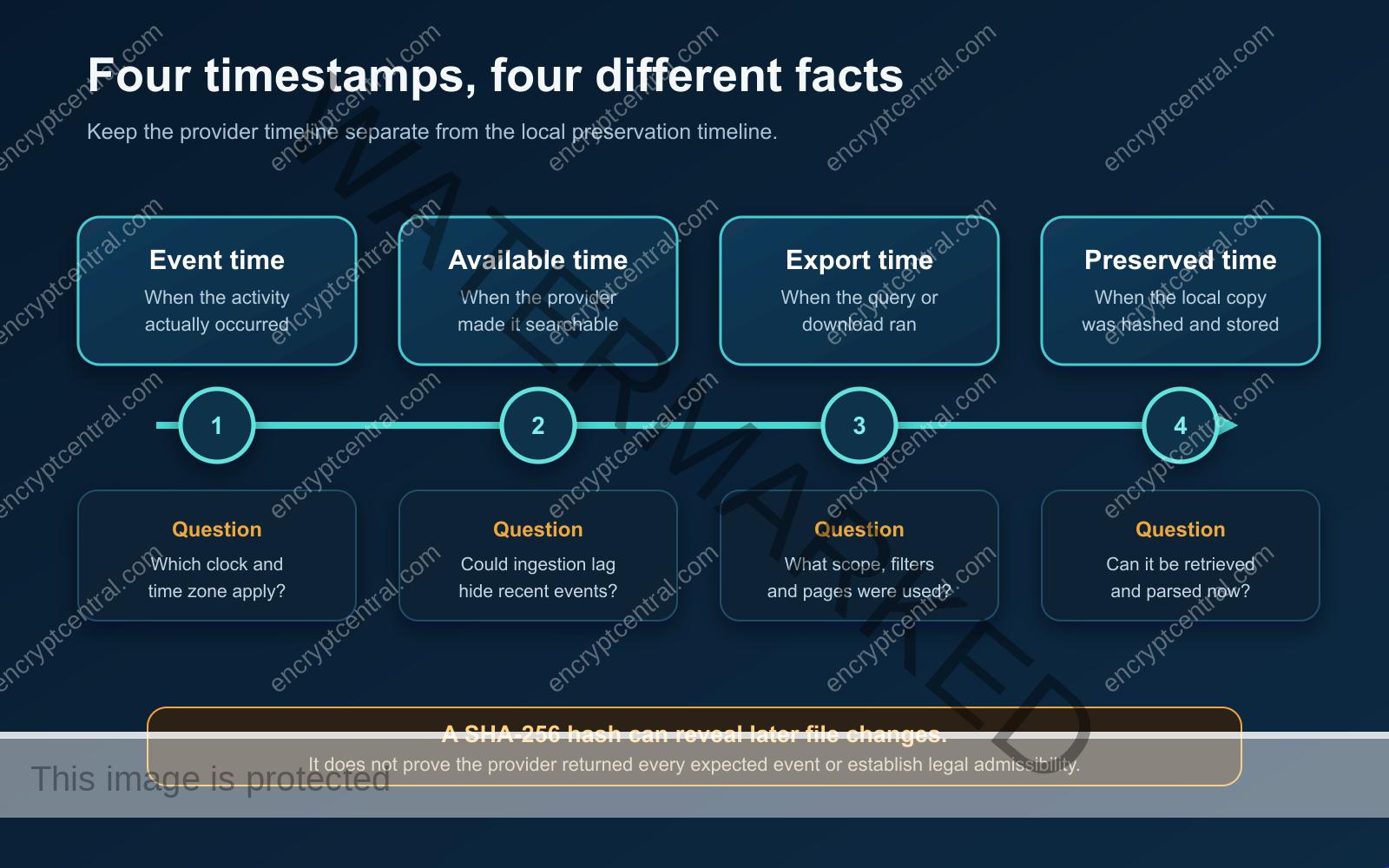
Audit exports can contain several clocks that answer different questions. Keep them separate:
- Event time: when the activity happened according to the record, including its time zone or UTC representation.
- Provider availability time: when the SaaS service made the event searchable or retrievable. This may be unknown, but expected lag and observed delay should still be noted.
- Export time: when the query, API request, or download ran.
- Preserved time: when the local copy was hashed and placed into controlled storage.
These timestamps help distinguish an incident-time fact from a collection-time fact. They also explain why two exports of the same requested interval may not be identical: delayed records can appear after the first query, retention can remove older records, or a policy and license can change between runs.
Bound the query and prove that every page or segment was collected
Use explicit start and end times, preferably normalized to UTC while retaining the source time-zone context. Record every filter: users, groups, applications, event types, workloads, IP addresses, and administrative units. If the interface supports only limited windows or record counts, split the job into deterministic segments and label each output so the pieces can be reassembled.
Microsoft documents important CSV export limits in its audit export guidance: a single query can export up to 50,000 records with Audit Standard and up to 1,000,000 with Audit Premium. Microsoft warns that records beyond the applicable limit may be omitted and recommends narrowing searches. A downloaded CSV therefore does not, by itself, prove that the requested time range is complete.
Segment a large Microsoft search by time, workload, user, or activity type. Use nonoverlapping UTC intervals when practical, but consider a controlled overlap if boundary behavior is unclear. Record the first and last event timestamp, returned row count, and file name for each segment. Then compare adjacent segments for unexplained gaps or duplicate boundary rows.
Parsing can create a second failure point. Microsoft audit exports can store event-specific fields inside the AuditData JSON property. Microsoft notes that Power Query discovers JSON properties from the first 1,000 rows when transforming the column. If later rows contain additional properties, a casual transformation can miss fields. Preserve the original export, document the parser and version, and verify the resulting schema against multiple event types rather than treating a spreadsheet view as the source of truth.
Google’s Admin SDK Reports API activities.list documentation describes a different retrieval pattern. Results are paginated, the default maxResults value is 1,000, and subsequent requests use nextPageToken as pageToken. Start and end times use RFC 3339 format. Gmail activity requests require an interval of no more than 30 days. That 30-day request constraint is an API rule; it should not be confused with the retention window for every Google log source.
For an API export, preserve the request parameters, response page count, page-token progression or a sanitized token log, returned record counts, error and retry history, and the final response showing that no next page remained. Exhausting pagination proves that you followed the interface’s page sequence; it does not prove that the provider generated or returned every expected event.
Use an export-coverage worksheet
A compact worksheet makes the process repeatable and reviewable. Use one row per file, API page set, or deterministic segment.
| Field | What to record | Why it matters |
|---|---|---|
| Product and entitlement | Tenant, edition, add-ons, relevant user or identity licenses | Shows which availability claims were expected to apply |
| Event scope | Workload, event family, identities, applications, filters | Prevents a narrow export from being described as tenant-wide |
| Retention and lag | Official documentation date, tenant policy, expected delay | Explains timing risk and when preservation must occur |
| Requested interval | Exact start, end, time zone, and segmentation rule | Defines the intended coverage |
| Returned coverage | Rows, pages, first and last event timestamps, boundary checks | Supports reconciliation and gap review |
| Collection details | Interface, endpoint or portal, parameters, export time, operator | Makes the collection method traceable |
| Preservation details | Original file name, SHA-256, storage location, access owner | Helps detect later file changes and locate the retained copy |
| Retrieval check | Date retrieved, tool used, parse result, sampled fields | Tests whether the preserved copy remains usable |
| Known limitations | Lag, licensing uncertainty, omitted sources, errors, unsupported fields | Prevents the export from being overstated |
Keep vendor documentation or a dated reference to it with the worksheet. Product behavior changes, and a future reviewer needs to know which rules you relied on. This same discipline can support a broader cyber-insurance evidence checklist, but the export should remain tied to its specific request and purpose.
Hash the original files, then protect and test them
Calculate a SHA-256 hash as soon as practical after the original file is saved. Record the algorithm, exact file name, byte size, hash value, preservation time, and person or system that performed the step. Do not edit the original. If you need a normalized table, filtered view, or parsed derivative, create it as a separate file and hash that file separately.
A matching hash can show that the bytes retrieved later are the same as the bytes hashed at preservation. It does not prove that the SaaS provider supplied every expected event, that the collection procedure was forensically sound, that the file is legally admissible, or that a particular chain-of-custody requirement has been met. Keep those limitations visible.
Place original exports and their manifests in storage that limits access, records meaningful administrative activity, and protects against accidental modification or deletion. Separate routine readers from administrators where the platform permits it. Use the organization’s approved retention and legal-hold processes rather than inventing a permanent archive for every export.
Finally, retrieve a preserved sample from the actual storage location. Recalculate the hash, open the file using the intended tool, parse its structured fields, and spot-check known rows or boundary timestamps. Record the result and any dependencies, such as a schema definition, decompression utility, encryption key, or parser version. Backup success is not the same as usable retrieval.
A practical SaaS audit log export runbook
- Authorize and scope the request. Record the purpose, tenant, event families, identities, time range, owner, and any legal or incident-response direction.
- Confirm current availability. Check the exact edition, licenses, workload or event-family retention, reporting lag, tenant retention policies, and interface constraints.
- Choose the retrieval method. Prefer a supported interface that exposes the necessary records and preserves structured fields. Record tool and API versions where applicable.
- Design bounded queries. Use explicit UTC start and end times. Plan deterministic segments below documented limits and define how pages, retries, duplicates, and boundaries will be handled.
- Collect without transforming the originals. Save raw results, request parameters, counts, page or segment identifiers, errors, and export timestamps.
- Reconcile the coverage. Confirm every planned segment and page is present. Compare counts, first and last event times, expected sources, and boundary records. Investigate unexplained gaps.
- Preserve with context. Hash each original, record file metadata, store it in a protected location, and attach the scope and coverage worksheet.
- Test retrieval and parsing. Retrieve from the protected copy, verify the hash, open and parse it, inspect representative fields, and record the outcome.
- State limitations. Note lag, licensing uncertainty, provider-side visibility limits, incomplete sources, parsing constraints, and the fact that the procedure does not independently prove completeness or admissibility.
- Review before the next deadline. Recheck vendor documentation, tenant configuration, and preservation cadence before the shortest relevant retention window expires.
When to export immediately
Do not wait for a perfect process when records may age out. An active incident, departing administrator, account compromise, material configuration change, litigation or regulatory direction, insurer request, or newly discovered retention gap can justify prompt preservation under the organization’s approved authority. Capture the best available scope and context, then document any limitations rather than silently filling them with assumptions.
If the underlying concern is that important security events are not being generated or noticed at all, address that separately. EncryptCentral’s guide to security logging and alerting failures explains why collection coverage and detection coverage are related but distinct problems.
What this checklist does—and does not—establish
This workflow helps an organization preserve SaaS audit records with a traceable scope, documented collection path, integrity check, and retrieval test. It is designed to reduce preventable losses caused by expired retention, truncated queries, uncollected pages, hidden transformations, and unreadable archives.
It does not certify a specific Microsoft 365 or Google Workspace tenant, guarantee that a provider returned every event, establish compliance, or create legal admissibility. No live tenant, administrative portal, API credential, export file, row count, or protected storage system was tested for this article. Before relying on an export, verify current vendor documentation and the actual configuration of the tenant in question.