

Validate an AppSec alert by giving the detector a small set of fabricated log records with a known answer. Include a case that should fire and nearby cases that should stay quiet. Compare the exact returned cases with your expectations. Then replay tagged synthetic records through an isolated test pipeline if your goal also includes ingestion or analyst routing.
Start with the failure the test should catch. A correlation might trigger in the wrong order. A duplicate delivery might count twice. A match might exist in the query results but never reach the analyst queue. Each failure needs different evidence. The Sigma and Kusto Query Language (KQL) exercises below give you a starting point for the first two. Both use invented data and require no application requests, login attempts, or bearer tokens.
Choose where the synthetic records enter
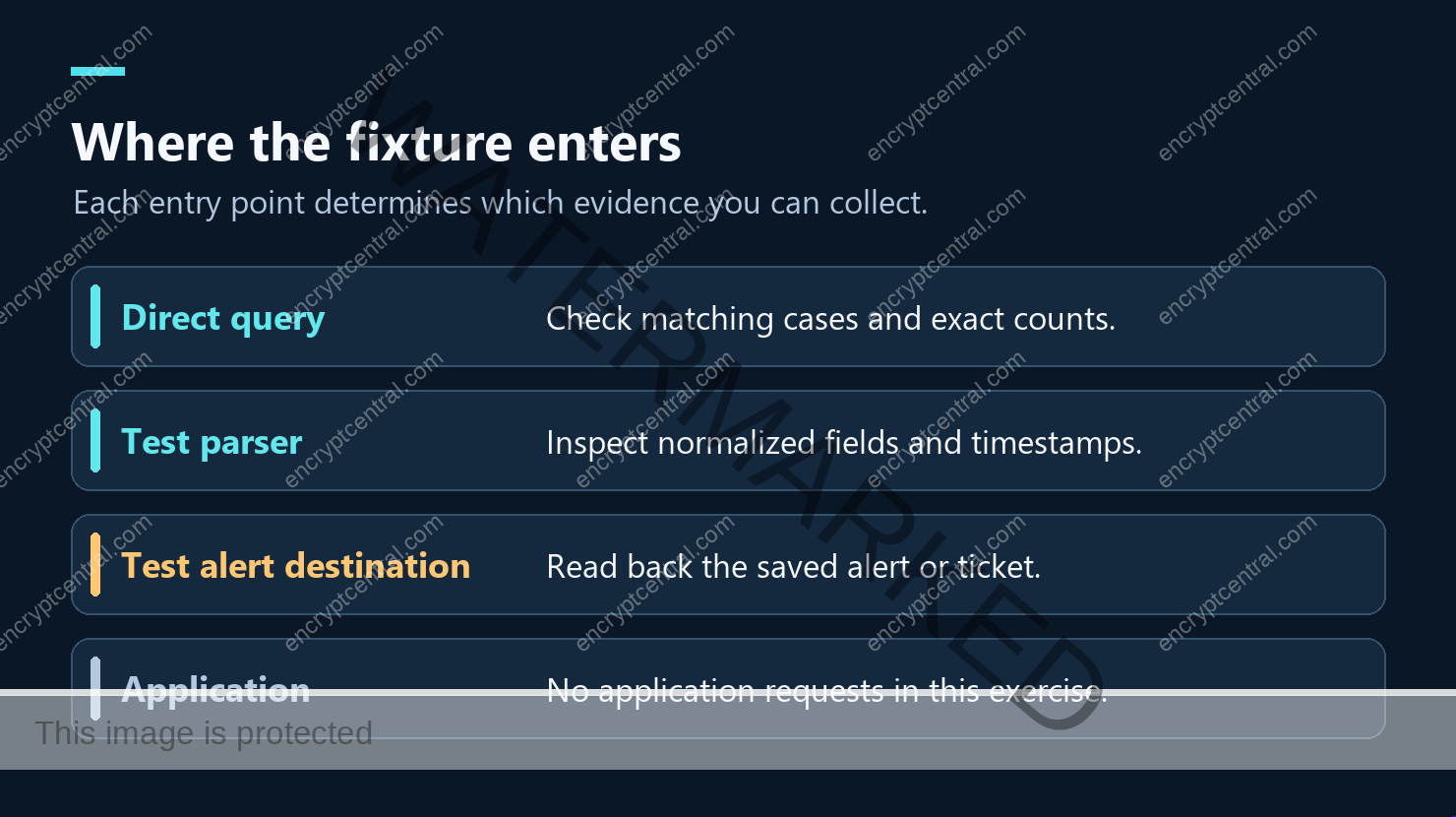
Start at the narrowest point that can answer your question. For rule logic, feed a fixture directly to a test query or an isolated rule evaluator. Compare the results with the expected case IDs and counts. This is the quickest way to spot a changed field name, altered threshold, or broadened rule. A fixture is a small, versioned input with a result you can state before running the test.
For parsing or enrichment, introduce fabricated records upstream of the parser in a dedicated test stream. Compare the original fixture with the normalized event. For routing, use a test destination and check the actual saved alert or test ticket. A row returned in the query editor proves the query matched. Delivery requires evidence from the receiving system. The security logging and alerting failures guide covers the broader event-to-responder chain.
Write down the entry point with each result. If a fixture bypasses the collector, the test tells you nothing about what that collector can reach or whether it is enabled. If it bypasses the application, it cannot establish that the application emits equivalent records. An end-to-end label only makes sense if the evidence spans the entire path you claim to have tested.
When a team needs separate evidence that applications enforce permissions, use an authorization review with dedicated test coverage. The broken access control testing checklist explains that separate verification job. The synthetic examples here start with recorded outcomes.
Give each event a small, explicit contract
Use UTC event timestamps, invented IDs, a fictional session, a normalized event type, and a test marker. Add an event ID where delivery can repeat. Keep one identifier for the exercise run and a separate identifier for each test case. Two cases can contain identical event types and timestamps without being part of the same sequence. A run ID stops separate replays from joining when they share a case ID.
Write the record fields and types beside the fixture. The examples use a Boolean test marker and a datetime event timestamp. A CSV parser may initially hand you strings, so check normalization before judging a rule. For a structured fixture, require every grouping key. Missing IDs deserve their own rejected input case, because a blank key can group unrelated events or make a real test case disappear.
For authentication outcomes, keep an allowlisted reason field such as verification_failed and a normalized route label. A route label should identify the application feature without carrying object IDs, query parameters, or free-form request text. The OWASP Logging Cheat Sheet describes useful event attributes and data that should usually be excluded, including access tokens. A pretend token adds nothing to a regression test for a verdict field. Use the verdict directly.
Freeze the example timestamps for the query test and run it over the full fixture. For a scheduled-rule test, translate the fixture timestamps into the test run’s evaluation interval while preserving relative times. Capture both event time and ingestion time in that run. They answer different questions when a record arrives late or a scheduled query appears to skip it.
Use Sigma to test event order
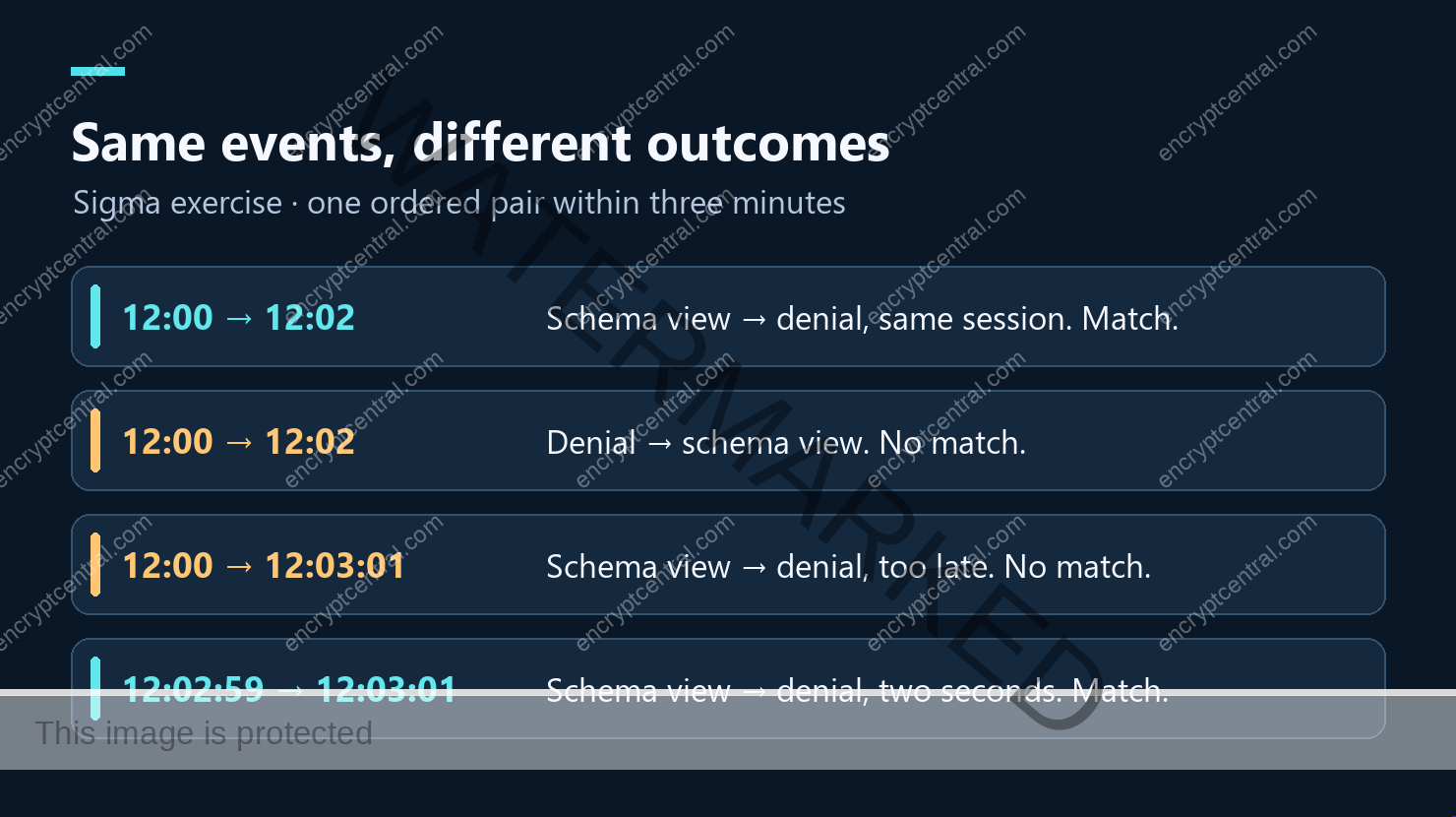
The first example represents two normalized events from a fictional application. A logged view of an API schema must precede an API denial for the same test session, case, and run within three minutes. The synthetic rows record those outcomes directly. The signal describes a sequence and cannot identify what produced it.
Define each event as a separate base rule. The correlation references those rules by name in the order you want. The Sigma correlation specification distinguishes ordered temporal matching from simple co-occurrence and from a distinct-value count. This exercise intentionally checks one ordered pair. If you want a burst of denials after the first event, you need a separate cardinality condition whose output preserves the order and grouping. A row count alone does not establish either.
title: Synthetic AppSec API schema viewed
name: ec_fixture_schema_viewed
status: test
logsource:
    category: webserver
detection:
    selection:
        Fixture: true
        EventType: schema_viewed
    condition: selection
---
title: Synthetic AppSec API request denied
name: ec_fixture_api_denied
status: test
logsource:
    category: webserver
detection:
    selection:
        Fixture: true
        EventType: api_denied
    condition: selection
---
title: Synthetic schema view followed by API denial
status: test
correlation:
    type: temporal_ordered
    rules:
        - ec_fixture_schema_viewed
        - ec_fixture_api_denied
    group-by:
        - RunId
        - CaseId
        - TestSession
    timespan: 3m
    condition:
        gte: 2
Supply all three YAML documents together when converting the rule. The field names are a deliberately small exercise schema. Map them explicitly to your test dataset and tell the backend which field carries event time. Confirm that the converted query actually enforces each grouping key, uses a rolling time difference where intended, and preserves order. SigmaHQ’s correlation guidance explains why backend support and timestamp accuracy matter.
Paste the rows below into your test dataset or parse the equivalent records in a local harness. The expected matching cases are ordered and across-bin. In across-bin, the two events are two seconds apart even though they straddle a fixed three-minute bucket boundary. That positive control catches conversions that silently substitute fixed buckets for elapsed time. reversed, outside-window, split-session, and unmarked must stay quiet.
EventTime,RunId,CaseId,TestSession,EventType,Fixture
2026-01-01T12:00:00Z,run-1,ordered,s-01,schema_viewed,true
2026-01-01T12:02:00Z,run-1,ordered,s-01,api_denied,true
2026-01-01T12:00:00Z,run-1,reversed,s-02,api_denied,true
2026-01-01T12:02:00Z,run-1,reversed,s-02,schema_viewed,true
2026-01-01T12:00:00Z,run-1,outside-window,s-03,schema_viewed,true
2026-01-01T12:03:01Z,run-1,outside-window,s-03,api_denied,true
2026-01-01T12:00:00Z,run-1,split-session,s-04,schema_viewed,true
2026-01-01T12:02:00Z,run-1,split-session,s-05,api_denied,true
2026-01-01T12:00:00Z,run-1,unmarked,s-07,schema_viewed,true
2026-01-01T12:02:00Z,run-1,unmarked,s-07,api_denied,false
2026-01-01T12:02:59Z,run-1,across-bin,s-06,schema_viewed,true
2026-01-01T12:03:01Z,run-1,across-bin,s-06,api_denied,true
Run each case on its own first, then run the combined fixture. Separate runs help find a bad selection. The combined run catches cross-case grouping. If you extend the suite, test events exactly at the documented boundary and events with equal timestamps. Decide what your team means by “followed by” when the source timestamp has only second-level precision. Use a known sequence field where the data provides one or document how equal timestamps are handled.
Use KQL to test token-free authentication outcomes
This exercise asks a different question. For each invented case and fixed five-minute bucket, did at least three distinct authentication rejections with the selected reason occur across at least two routes? The numbers make the expected result easy to inspect. Choose operational thresholds separately based on the behavior and volume of your own system.
Microsoft documents an inline datatable operator that defines both the schema and the rows. The entire input here lives inside the query. The documented AppServiceHTTPLogs table does not list a RequestHeaders column. This test uses explicit outcome and reason fields of its own, so it has no dependency on that table or on raw authentication headers.
let Events = datatable(
    EventTime:datetime, CaseId:string, EventId:string,
    Route:string, Outcome:string, Reason:string
) [
    datetime(2026-01-01 12:00:01), "match", "m1", "/orders", "rejected", "verification_failed",
    datetime(2026-01-01 12:00:02), "match", "m2", "/profile", "rejected", "verification_failed",
    datetime(2026-01-01 12:00:02), "match", "m2", "/profile", "rejected", "verification_failed",
    datetime(2026-01-01 12:00:03), "match", "m3", "/orders", "rejected", "verification_failed",
    datetime(2026-01-01 12:00:01), "duplicate", "d1", "/orders", "rejected", "verification_failed",
    datetime(2026-01-01 12:00:02), "duplicate", "d2", "/profile", "rejected", "verification_failed",
    datetime(2026-01-01 12:00:02), "duplicate", "d2", "/profile", "rejected", "verification_failed",
    datetime(2026-01-01 12:00:01), "one-route", "r1", "/orders", "rejected", "verification_failed",
    datetime(2026-01-01 12:00:02), "one-route", "r2", "/orders", "rejected", "verification_failed",
    datetime(2026-01-01 12:00:03), "one-route", "r3", "/orders", "rejected", "verification_failed",
    datetime(2026-01-01 12:00:01), "other-reason", "x1", "/orders", "rejected", "verification_failed",
    datetime(2026-01-01 12:00:02), "other-reason", "x2", "/profile", "rejected", "verification_failed",
    datetime(2026-01-01 12:00:03), "other-reason", "x3", "/profile", "rejected", "expired",
    datetime(2026-01-01 12:04:59), "split-window", "w1", "/orders", "rejected", "verification_failed",
    datetime(2026-01-01 12:05:00), "split-window", "w2", "/profile", "rejected", "verification_failed",
    datetime(2026-01-01 12:05:01), "split-window", "w3", "/orders", "rejected", "verification_failed"
];
Events
| where Outcome == "rejected" and Reason == "verification_failed"
| extend WindowStart = bin(EventTime, 5m)
| summarize by CaseId, WindowStart, Route, EventId
| summarize RejectionsOnRoute = count() by CaseId, WindowStart, Route
| summarize Rejections = sum(RejectionsOnRoute), Routes = count() by CaseId, WindowStart
| where Rejections >= 3 and Routes >= 2
| project CaseId, WindowStart, Rejections, Routes
| order by CaseId asc, WindowStart asc
Expect one result: match, bucket start 12:00:00 UTC, three rejections, two routes. The first summarize produces one row per case, bucket, route, and event ID. The next counts events per route. The last adds those counts and counts the route groups. This assumes a repeated event retains its original ID, event time, and normalized route. If duplicates disagree about those fields, define a normalization or quarantine policy before aggregating them.
The duplicate case has three rows but only two unique events. The one-route case meets the rejection threshold and fails the route threshold. other-reason shows why a rejection category matters even when the verdict is the same. split-window has three events within a few seconds and stays quiet because the query uses fixed five-minute buckets. If the intended rule is “any five consecutive minutes,” change the time-window logic and make split-window a positive case in the revised fixture.
Fixed buckets make the exercise easy to audit and can suit some reporting rules. For detection, document the tradeoff before using them. A scheduled lookback, a fixed aggregation bucket, and a rolling sequence window are three different settings. Keep them separate in the expected results and include an event exactly on a bucket boundary. A configuration change in one setting should have a specific regression case that exposes it.
Turn the examples into release checks
Version the fixture beside the rule, along with the expected cases and the evaluation assumptions. Compare complete sets of case IDs and selected values. Counting result rows alone can miss a regression in which the right case disappears and a different case takes its place. Match the KQL counts in addition to the ID, and record whether the Sigma backend reports matching groups or individual event pairs.
- Check conversion. Record the Sigma converter and backend versions. Compare the emitted rule with the intended ordering, grouping, time field, and supported window semantics.
- Check normalized input. Record the test stream, timestamp interpretation, Boolean mapping, and identifiers. Inspect one normalized row per case before judging the detector.
- Check the exact outcome. Retain actual and expected IDs and key counts for both positive and negative cases. Preserve the smallest fixture that demonstrates each failure.
- Check the saved alert. If delivery is in scope, verify the rule version, run identifier, severity, test label, destination, and observed delivery time in the receiving system.
- Decide whether to promote. Require the detector’s expected behavior and each separately scoped downstream check to pass before signing off on a rule change.
Use a test destination for the delivery check, with automated containment, account changes, and customer notifications disabled for the fixture stream. Give each replay a fresh run ID. When alert deduplication is in scope, deliberately repeat the same run ID for that one case and document whether the second alert should be grouped or suppressed. Preserve the receiving record and the deduplication setting that explain what happened.
Diagnose the first observed mismatch
If neither Sigma positive case appears, inspect base-rule results before changing the correlation. Check the event names, Boolean field, and timestamps. If the reversed case appears, inspect the converted query for actual ordered matching. If the cross-boundary case disappears while the ordinary positive works, inspect fixed-bucket behavior. If the split-session case appears, check whether the converter and normalized data both retained the session key.
If the KQL duplicate case appears, inspect the number of distinct route and event combinations before checking the alert threshold. If only the split-window case behaves unexpectedly, compare the time format and bucket anchors with the intended policy. When the rule matches but there is no test ticket, check suppression, routing, and delivery state separately. Relaxing the detection condition cannot fix a disabled connector and may create more noise once delivery is restored.
Capture failures using the exact rule revision and fixture version. A pass with different bytes than the ones under review cannot settle the release question. Likewise, a lab result should state which engine, parser, and destination were exercised. These examples illustrate repeatable checks and expected outcomes. They provide no evidence about an organization’s deployment or coverage against live activity.
When unexpected results trace back to drift in a collector or deployment, reopen the configuration change alongside the failing fixture. The security misconfiguration checklist offers a broader process for assigning and verifying that repair.
Keep the evidence small enough to rerun
A useful starting test suite fits in a code review. Keep an ordered positive, a reversed negative, a time-boundary case, a grouping case, and a duplicate case. Add a new fixture when you fix a real regression so the same failure has a permanent check. Record which layers passed and which still need a test run.
Pick a rule your team expects to change soon. Put its intended result in writing, build one fixture that should trigger and two close cases that should stay quiet, and have a reviewer reproduce the expected results. If the alert matters operationally, add a separate check for receipt in the test analyst queue. That gives the next rule revision a clear acceptance decision grounded in observable behavior.